
Quality assurance is not a final check before launch. A reliable QA process starts when requirements are written, continues through test planning and execution, and keeps running after release through defect tracking, regression testing, and reporting.
For a startup, the right QA stack should do three things without adding process drag: document the work, catch defects early, and make each release easier to trust. These five tools cover the core jobs: workflow control, bug tracking, browser automation, low-code test creation, and GUI regression testing.
A lean QA process usually follows this sequence: review requirements, define testing goals, create a test plan, build test cases, execute tests, log defects, retest fixes, and analyze the results. Teams that skip the early steps often pay for it later because unclear requirements and weak test coverage create expensive rework. The current World Quality Report frames quality engineering around automation, AI, and continuous improvement, which matches how modern teams now run QA.
The tools below are not interchangeable. A defect tracker cannot replace test automation, and a test runner cannot replace a documented QA workflow. Use them together so every test has an owner, every defect has context, and every release leaves behind useful evidence.
A successful QA process for a startup begins with assessment, not tool selection. Review the documentation and requirements for the final product before the software is complete, then make sure the requirements are clear, consistent, and testable. This preliminary quality control work reduces expensive rework because defects found during design and development are easier to fix than defects found during late testing or production.
From there, define your testing goals. Identify the areas, functionalities, and product behavior that testing will focus on, then document the scope, conditions, purpose, and targets of each test case. A useful QA plan covers consistency, performance accuracy, stability, clarity, completeness, and executability. It should also account for distribution, target audience, support expectations after launch, and the software and hardware characteristics your customers actually use.
The testing strategy should turn those goals into test cases, checklists, responsibilities, budgets, deadlines, and bug handling procedures. Outline the data each test will use, the steps needed to execute each case, and the environment required to make results meaningful. A strong test environment resembles production closely enough to include relevant databases, network configurations, operating systems, integrations, and infrastructure. Teams should also decide which parts of testing can be automated to reduce time, cost, and human error.
Execution usually starts at the unit level, where developers or QA specialists verify isolated pieces of code such as a method, function, procedure, object, or module. Unit testing is often white-box testing because the code, infrastructure, and working mechanisms are visible to the people making the assessment. After that, integration testing checks whether modules, APIs, UI design, and related features work together according to the requirements and specifications. Validation cases then help confirm that the product keeps functioning properly through the program’s lifecycle.
When test execution reveals bugs or inconsistencies, track every defect in a system that records status, owner, severity, steps to reproduce, and fix history. Update the logs when a bug is fixed so the team can pinpoint which fix created the issue if another feature breaks after implementation. After fixes are complete, rerun the same test cases, add regression testing, and recheck important integration paths. Before deployment, smoke testing should confirm that the final build is functional, stable, and ready for launch based on the release documentation, implemented functionality, conducted fixes, and known software limitations.
If you do not have a dedicated quality assurance team, setting one up from scratch can be time-consuming and costly. Some startups outsource QA to a third-party provider, while others invest in a QA specialist who can springboard the program into action and train the internal team. Either path should lead to the same outcome: more efficient production, better resource management, fewer production issues, and a stable product that customers can trust.
- Process Street for QA workflow orchestration and evidence.
- Bugzilla for open-source defect tracking.
- Selenium for cross-browser automation.
- TestComplete for low-code commercial UI automation.
- Ranorex for desktop, web, and mobile GUI regression testing.
If you are still building the broader QA stack, compare these picks with a dedicated test management tools shortlist. The goal is not to collect software. The goal is to make the QA process repeatable enough that a small team can ship without losing control of quality.
1. Process Street
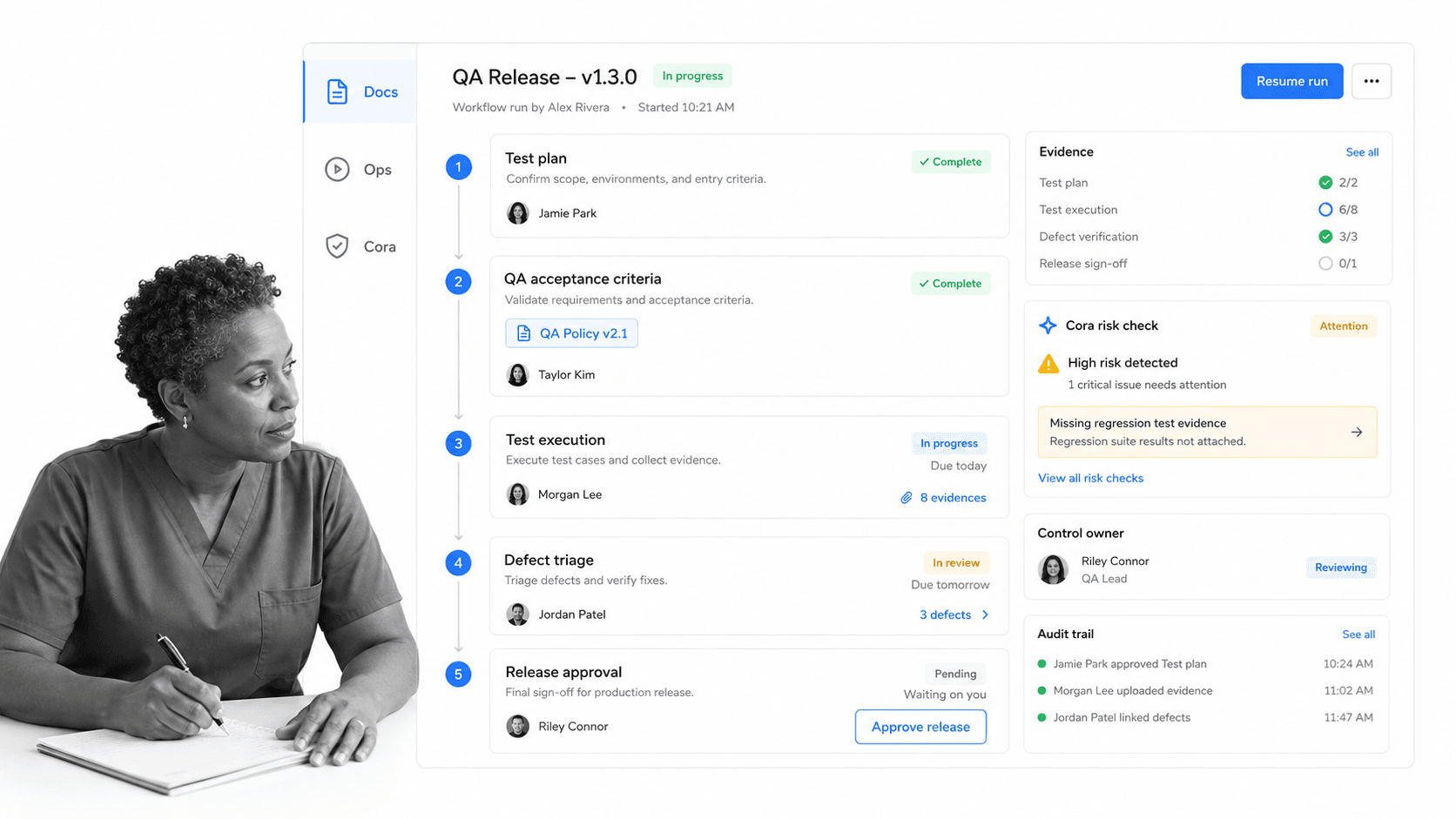
Process Street is the Compliance Operations Platform for teams that need recurring work to happen the right way every time. In a QA process, it is the operating layer around the testing itself: the SOP, checklist, approval path, evidence record, and escalation system that keeps releases from depending on memory.
For QA teams, Process Street is broader than a checklist tool. Docs gives teams a governed place to maintain QA procedures and release standards. Ops turns those procedures into workflow runs with assignments, approvals, due dates, conditional logic, and automations. Cora monitors execution, flags risk, and helps teams improve the process instead of waiting for problems to repeat.
That makes Process Street useful before, during, and after testing. A startup can run a release QA workflow, assign test owners, require approval before deployment, capture links to bug reports, and keep an audit trail of what happened. Process Street has direct, universal integrations to 5,000+ systems. Need a new one? An AI agent builds it on the fly. That lets QA workflows connect to tools like GitHub, Jira, Slack, Google Sheets, and your test automation stack without making the QA process live in scattered messages.
Useful workflow controls include stop tasks, conditional logic, dynamic due dates, task permissions, task assignments, role assignments, embed widgets, webhooks, and approvals. Those controls matter because QA still requires collaboration across product, engineering, support, and operations even when the release checklist itself looks simple.
Use Process Street when you need a controlled QA workflow, not just a place to write test cases. It is strongest when the QA process involves multiple people, approvals, release gates, customer impact, or compliance expectations.
2. Bugzilla
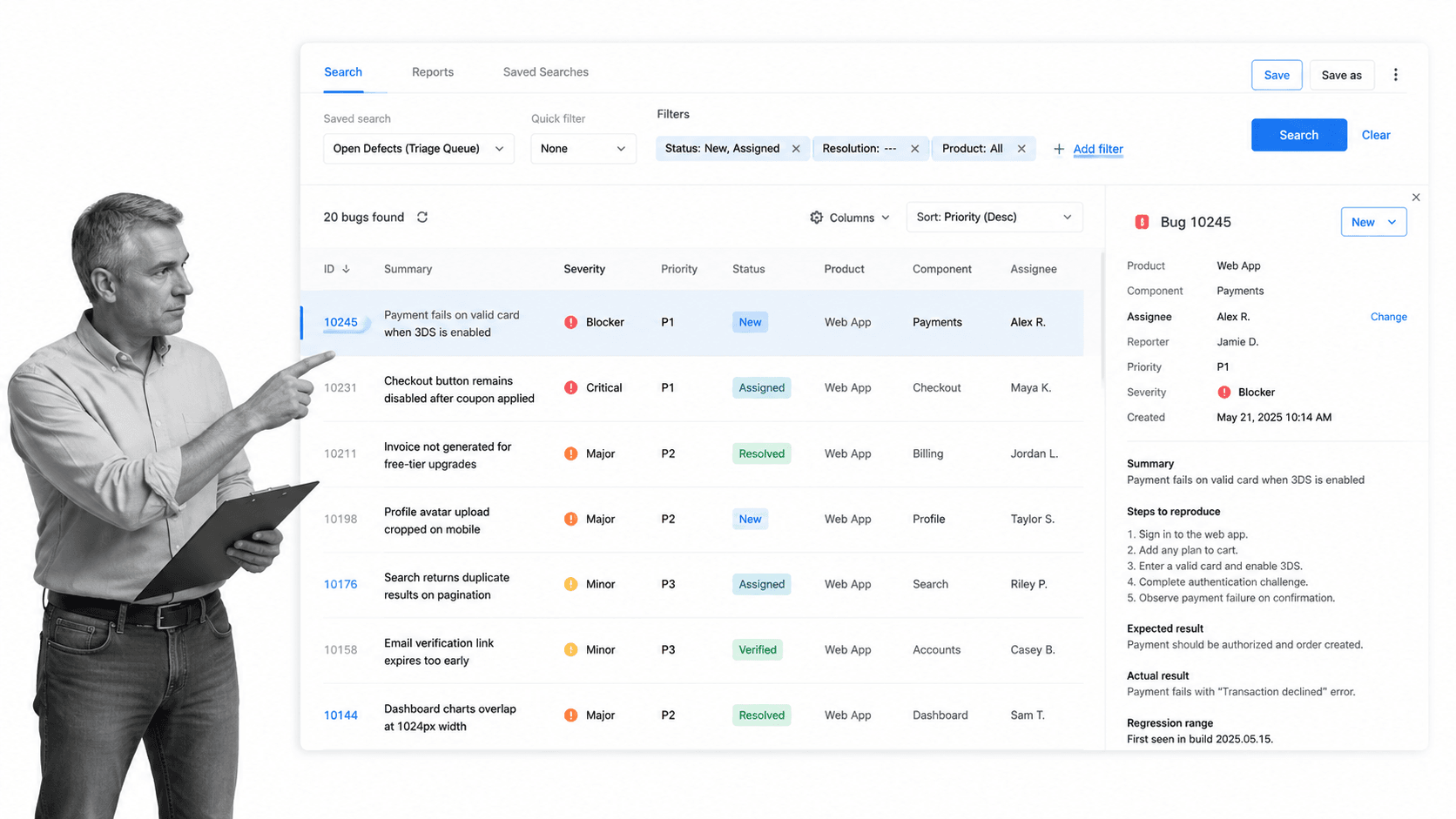
Bugzilla is a long-running open-source bug tracking system. It is not the newest interface in the QA market, but it still does the core defect-tracking job well: capture an issue, classify it, assign it, search it, discuss it, and track it through resolution.
Bugzilla is most useful for teams that want a free, self-managed tracker with mature search and reporting. It supports product and component structures, saved queries, email notifications, duplicate detection, permissions, and custom workflows. For startups with engineering-heavy teams, that can be enough to build a disciplined defect process without buying a larger test management suite.
Core capabilities include a search system for finding bugs quickly, drop-down lists and auto-complete to simplify searches, a query tool that remembers user searches, email notifications about changes, automatic reports by query and date, and automatic duplicate bug detection.
It also enables both individual and collaborative work on a project, which is why it can be useful for startups and larger businesses alike when the team wants open-source defect tracking.
The caveat is that Bugzilla should not be treated as the whole QA process. It tracks defects after they are found. You still need a clear test plan, defined test cases, regression coverage, and a workflow for deciding which defects block release. That is where a process layer and automation tools matter.
3. Selenium
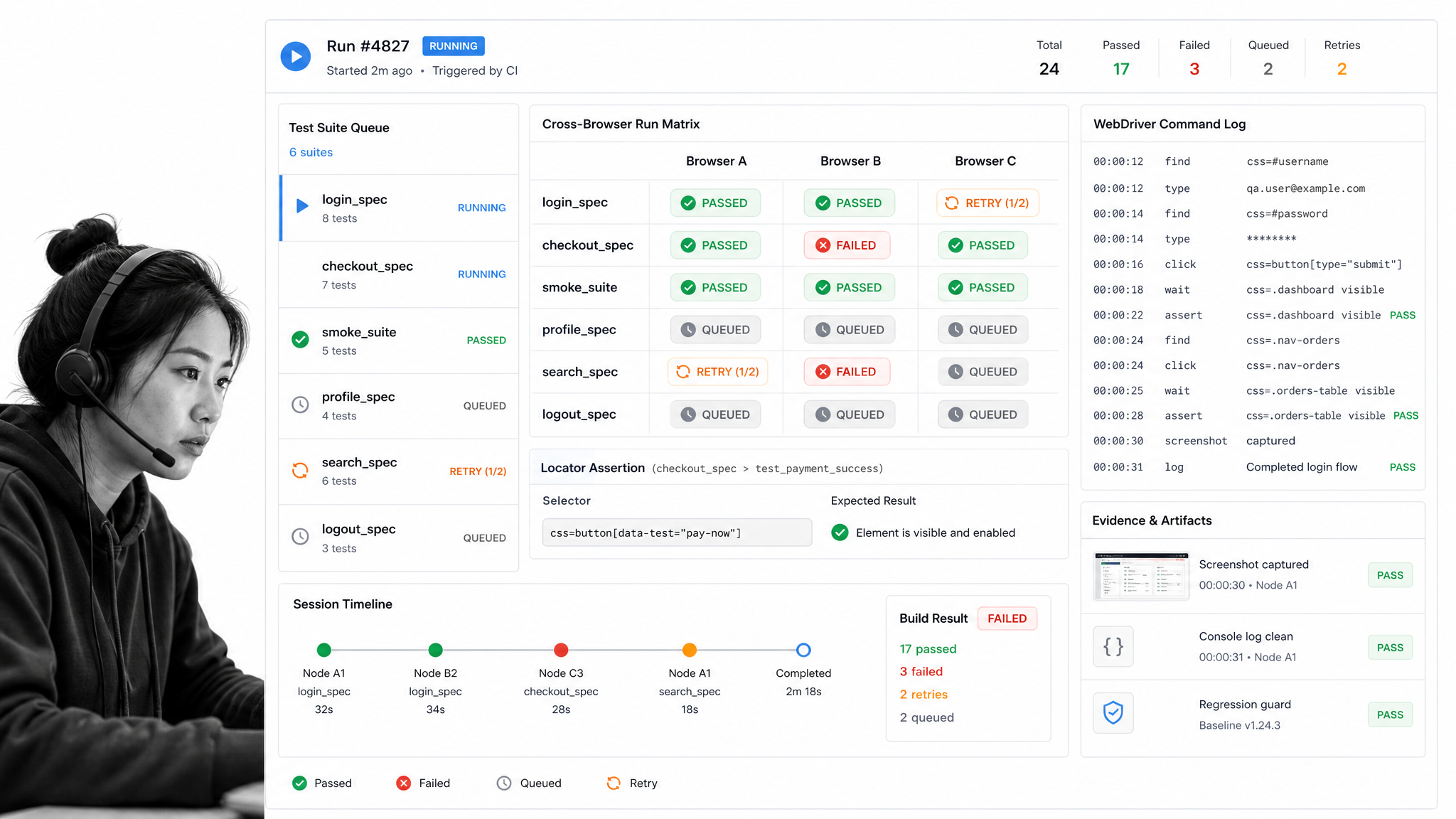
Selenium remains one of the most important tools for browser automation. It supports multiple languages and browsers, and Selenium Grid helps teams run tests across different environments. For a startup that needs broad browser coverage and has engineering resources, Selenium is still a credible foundation.
The modern Selenium conversation is more nuanced than it used to be. Playwright has become a strong default for many new web end-to-end suites because it provides auto-waiting, resilient locators, parallel execution, and first-class support for Chromium, Firefox, and WebKit. Cypress is also common for frontend teams that want fast local feedback and strong debugging for JavaScript applications.
That does not make Selenium obsolete. It still works well when you need language flexibility, enterprise browser coverage, or an existing Selenium suite that already provides value. The best choice depends on your product, team skill, CI pipeline, and tolerance for test maintenance.
Selenium remains attractive when a team needs parallel test execution, cross-platform test cases, and broad language support across C#, Python, Java, PHP, JavaScript, Perl, Ruby, Groovy, and other languages. It also has a comparatively low demand on resources when the suite is designed carefully.
It can automate web application testing on Linux, Mac, and Windows, and it can create cross-platform test cases applicable across operating systems when the test architecture is maintained carefully.
4. TestComplete
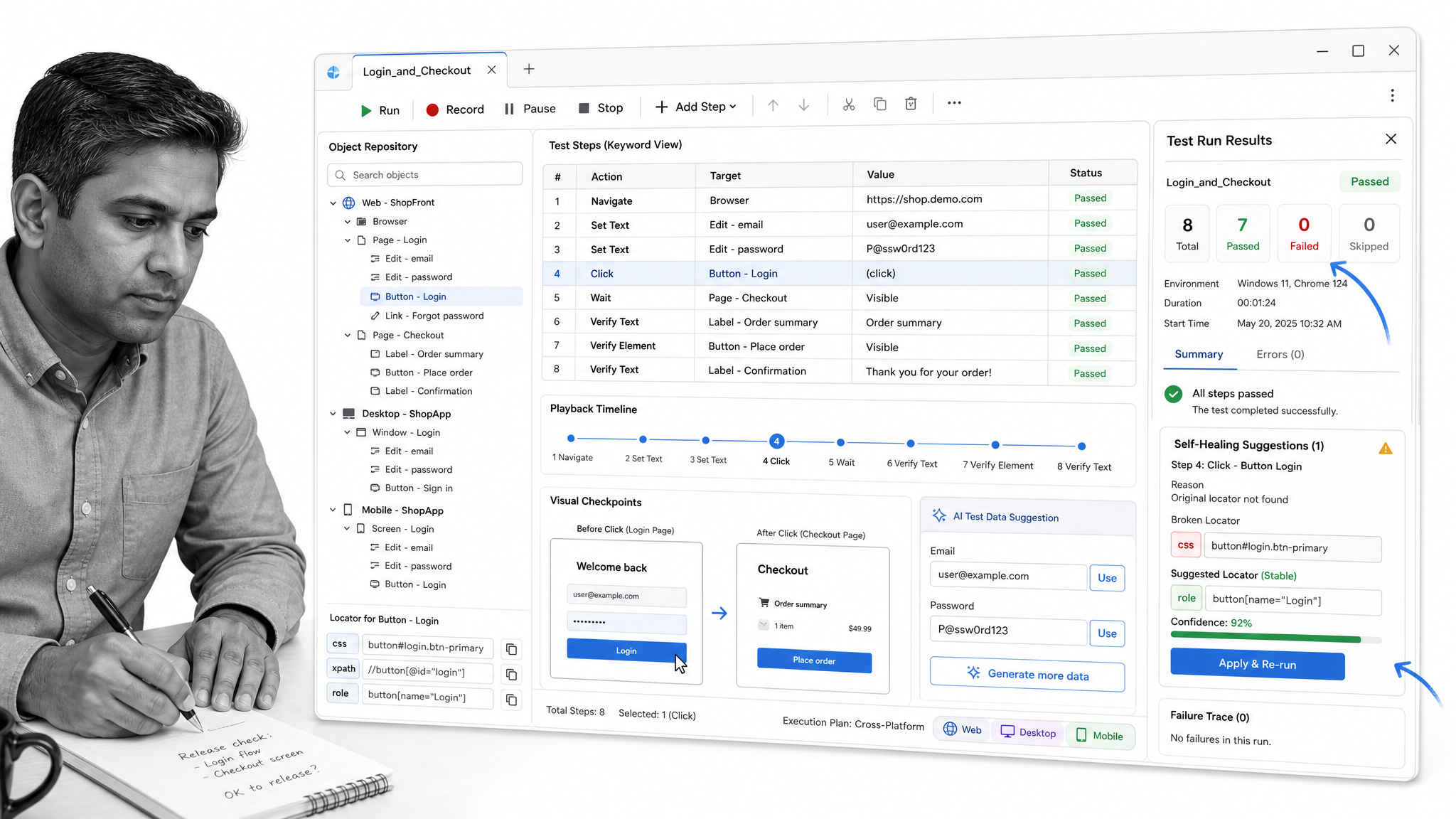
TestComplete is SmartBear’s commercial UI automation platform for web, desktop, and mobile applications. It is a better fit when your team wants low-code or script-assisted test creation instead of building every automation flow from scratch.
TestComplete is useful for teams with QA analysts who understand the product deeply but do not want every test to depend on a developer. Current positioning includes recorded tests, AI-assisted test data, self-healing tests, OCR, visual testing, and support for multiple scripting languages. That makes it stronger for mixed-skill QA teams than for engineering teams that already prefer code-first frameworks.
It is also useful for data-driven testing, building an automated test suite with little to no scripting knowledge, supporting multiple scripting languages, and creating custom plugins or extensions for specific QA needs.
For a startup, the decision is practical. If your app is mostly a modern web product and your developers own test automation, Playwright or Selenium may be the simpler path. If you have complex UI flows, non-web surfaces, or QA specialists who need to create and maintain tests directly, TestComplete can earn its place.
5. Ranorex
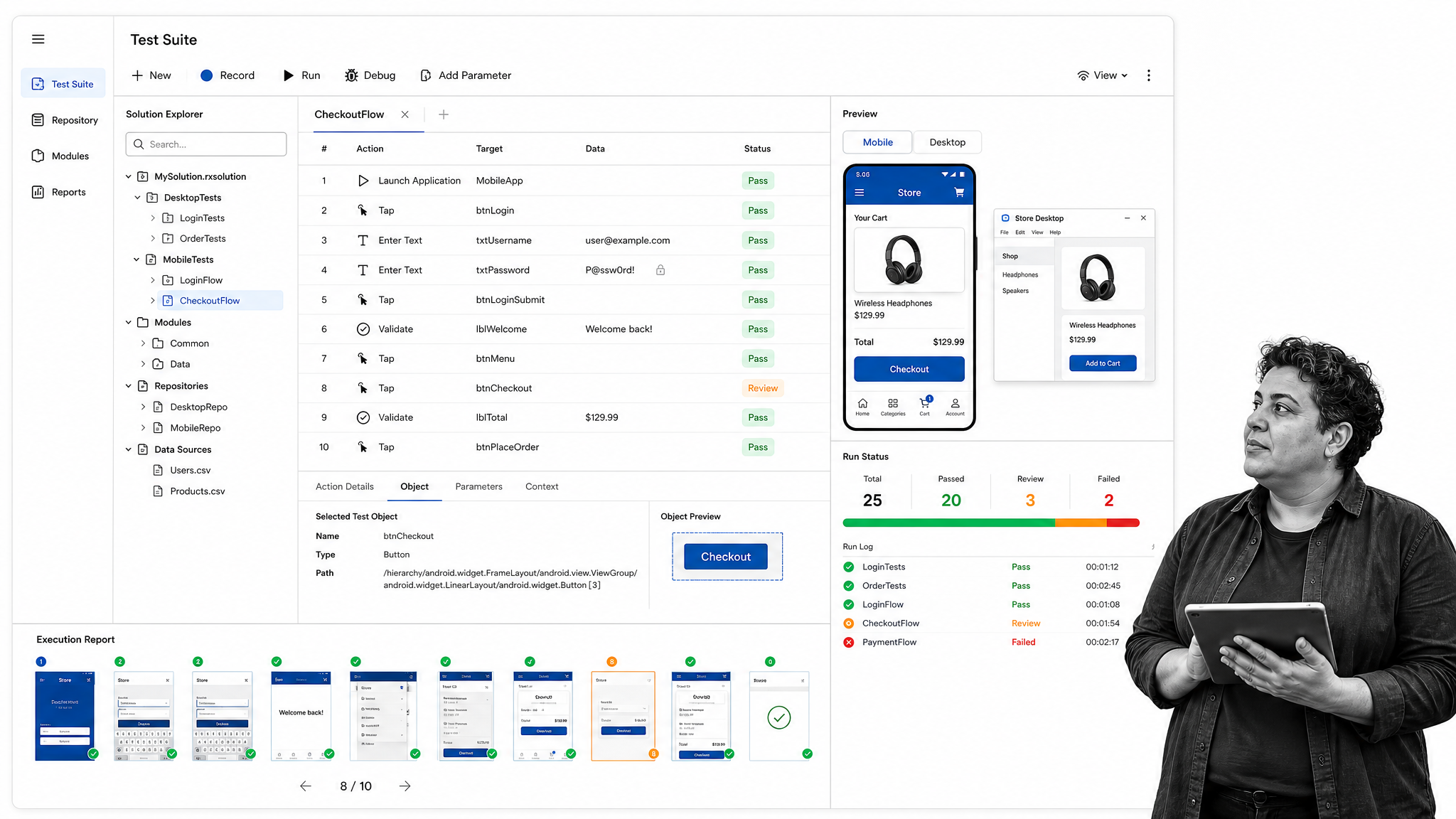
Ranorex is a GUI test automation platform for desktop, web, and mobile applications. It is strongest when your QA process includes interfaces that are hard to cover with browser-only test frameworks, such as legacy desktop software, complex business applications, or mixed desktop and mobile release paths.
Ranorex combines low-code test building with a full IDE, object recognition, reusable modules, reporting, and integrations with other development tools. That makes it useful for regression-heavy products where the cost of repeated manual testing is high and the product surface changes slowly enough for GUI automation to pay off.
Relevant capabilities include graphical user interface object recognition, dynamic web element identification, page object mapping, automatic timeout handling, reusable code modules, a shareable object repository, cross-platform testing, legacy application automation, auto report generation, and parallel test runs.
Use Ranorex as a specialist tool, not as the default answer for every startup. If your product is web-only, start with a lighter browser automation stack. If your QA process has desktop, mobile, or legacy GUI complexity, Ranorex can help turn those repeated manual checks into a controlled regression suite.
FAQ
What are the key stages of a QA process?
The key stages are requirements review, test planning, test case design, test execution, defect tracking, regression testing, smoke testing, and results analysis. The exact sequence changes by product, but the logic is stable: define what quality means, test against that definition, fix what fails, and keep evidence of the work.
Which QA testing tool should a startup choose first?
Start with the tool that fixes your biggest process risk. If releases are chaotic, start with Process Street for workflow control. If bugs are getting lost, start with a defect tracker like Bugzilla. If manual browser testing is slowing releases, start with Selenium, Playwright, or Cypress. If mobile testing matters, add Appium.
How does QA support startup growth?
QA supports growth by reducing rework, making releases more predictable, and helping the team learn from defects instead of repeating them. A strong QA process also protects customer trust because bugs are found before they reach production, and fixes are verified before the next release goes out.
Manual QA procedures are time-consuming, expensive, and ineffective when they are repeated without automation or reporting. Automate test case execution and report generation wherever possible, then use the software above to enhance the testing process without losing the judgment of developers and QA specialists.
For more practical workflows, see Process Street’s Software Testing Tutorial, Software Debugging Process, and Software Deployment templates. You can also keep reading about software development processes, agile software development, software development culture, and QMS software.
The post 5 Essential Tools for a Successful QA Process in Your Startup first appeared on Process Street | Compliance Operations Platform.


0 Commentaires