If you use Google Drive, Dropbox, or SharePoint, you already use a document management system. The real question is whether that system can keep documents organized, governed, searchable, and connected to the work people actually need to do.
A strong DMS gives teams a reliable place to store files, control access, manage versions, route approvals, and prove what happened. The six options below cover lightweight collaboration, enterprise content management, regulated document control, and workflow-driven operations.
Use this comparison to match the tool to the job. If your main problem is secure storage and collaboration, a cloud drive may be enough. If your documents control regulated work, approvals, or recurring procedures, you will need stronger governance and workflow automation.
What to look for in document management software
- Permission control: Can admins set access by team, role, folder, document, or external collaborator?
- Version history: Can the system show who changed a document, when it changed, and whether a team is using the current version?
- Search and metadata: Can users find documents by owner, client, process, status, tag, or retention requirement?
- Approval workflows: Can policies, contracts, SOPs, and forms move through review without relying on email threads?
- Audit evidence: Can you prove that the right person reviewed, approved, acknowledged, or completed the right document-driven task?
- Integrations: Can the system connect to the apps where work already happens?
If your use case is closer to formal document control, compare these options with dedicated document control software. If the challenge is how documents move through recurring work, it also helps to map the broader document process management flow.
Zoho WorkDrive
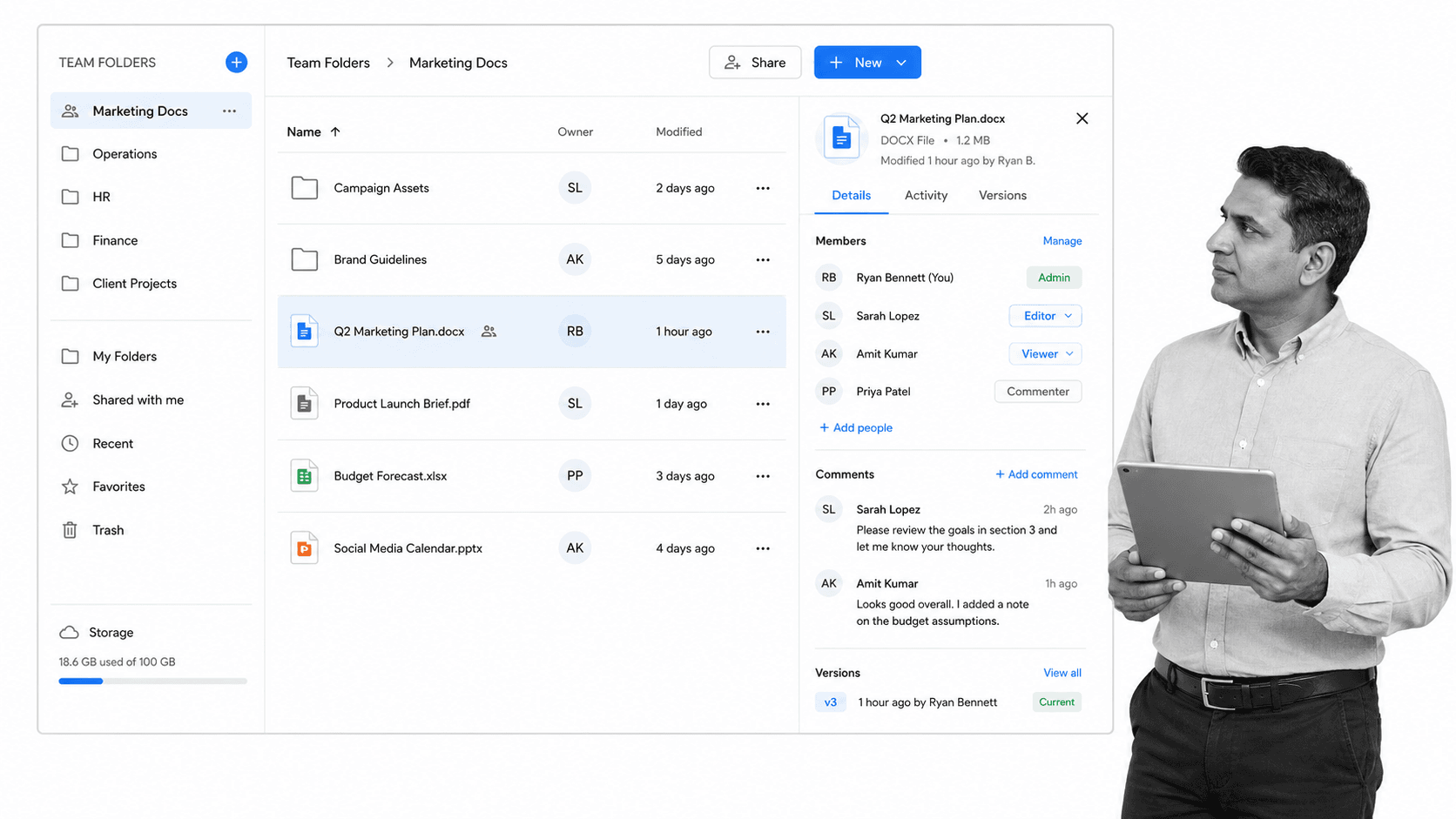
Zoho WorkDrive is the team file management product that replaced Zoho Docs. It is built for shared workspaces rather than individual file dumps, with Team Folders, role-based permissions, external sharing controls, universal search, and native Zoho Office editors for documents, spreadsheets, and presentations.
WorkDrive is a practical fit for small and mid-sized teams that already use Zoho CRM, Zoho Projects, Zoho Desk, or the wider Zoho One suite. The advantage is continuity: teams can store files, collaborate on them, and keep them close to the business records they support.
The tradeoff is that WorkDrive is still primarily a cloud content and collaboration layer. It can support review and access governance, but teams with strict policy acknowledgement, recurring SOP execution, or evidence collection needs may need workflow tooling alongside it.
- Best for: Zoho-centric teams that need shared document storage and collaboration.
- Strengths: Team folders, document editing, external sharing controls, Zoho ecosystem fit.
- Watch out for: Less suited to complex compliance workflows without additional process automation.
Revver
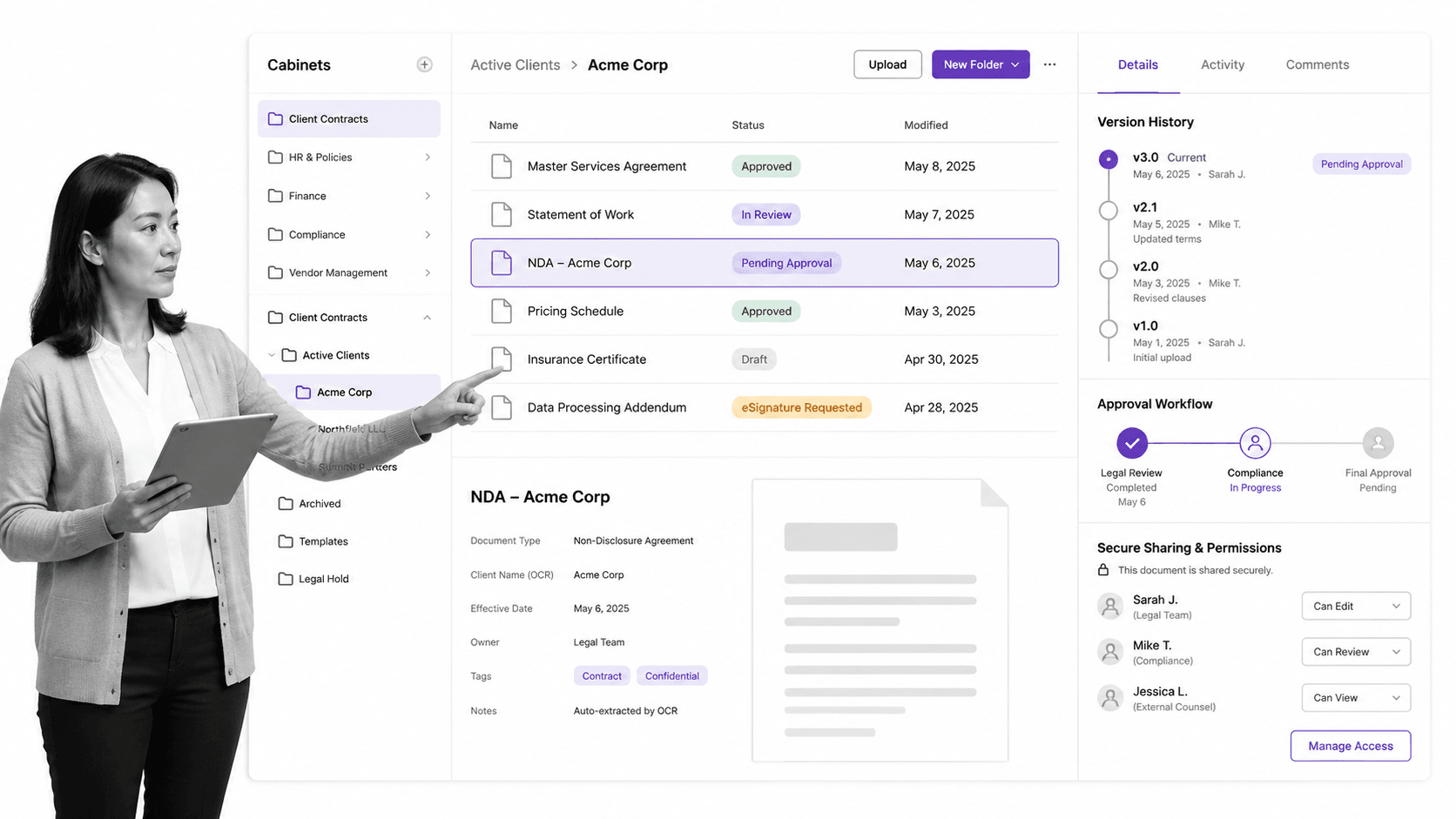
Revver, formerly eFileCabinet, focuses on document-heavy businesses that need secure storage, client files, approvals, e-signatures, retention support, and repeatable document workflows. It is especially relevant for accounting, financial services, legal, HR, and professional services teams.
Where a general cloud drive starts with folders, Revver starts with the document lifecycle. Teams can capture files, classify them, route them, request signatures, and maintain cleaner records for client or compliance needs.
Revver is most useful when the document itself is the center of the process. If your team mainly needs collaborative drafting or broad company knowledge sharing, it may feel more specialized than necessary.
- Best for: Client file management and regulated document workflows.
- Strengths: Secure storage, document routing, e-signature support, OCR and extraction, retention-oriented workflows.
- Watch out for: More focused on document operations than everyday collaborative editing.
Google Drive
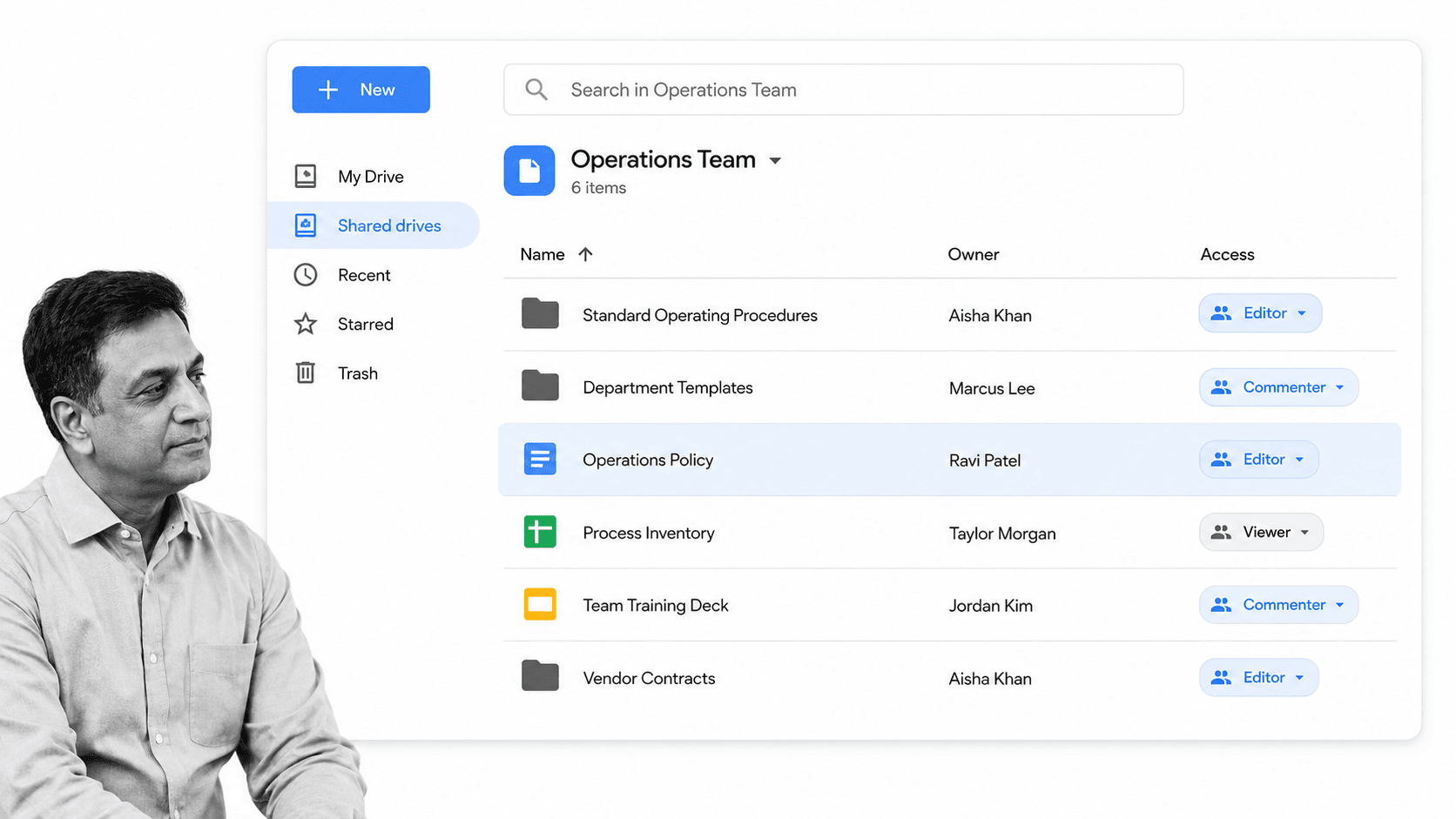
Google Drive is one of the easiest document management systems to adopt because it is already built into Google Workspace. Teams get shared drives, Docs, Sheets, Slides, comments, version history, search, permissions, and collaboration that feels natural to most users.
Drive works well when the primary need is fast collaboration and access from anywhere. Shared drives help teams avoid personal file ownership problems, and Workspace admin controls add useful governance around sharing, retention, security, and device access.
The risk is that Drive can become messy when teams rely on informal folder habits. Without naming conventions, ownership rules, review cycles, and workflow guardrails, documents can multiply faster than people can govern them.
- Best for: Teams already standardized on Google Workspace.
- Strengths: Real-time editing, search, simple sharing, shared drives, familiar user experience.
- Watch out for: Needs clear structure and process rules to avoid sprawl.
Process Street
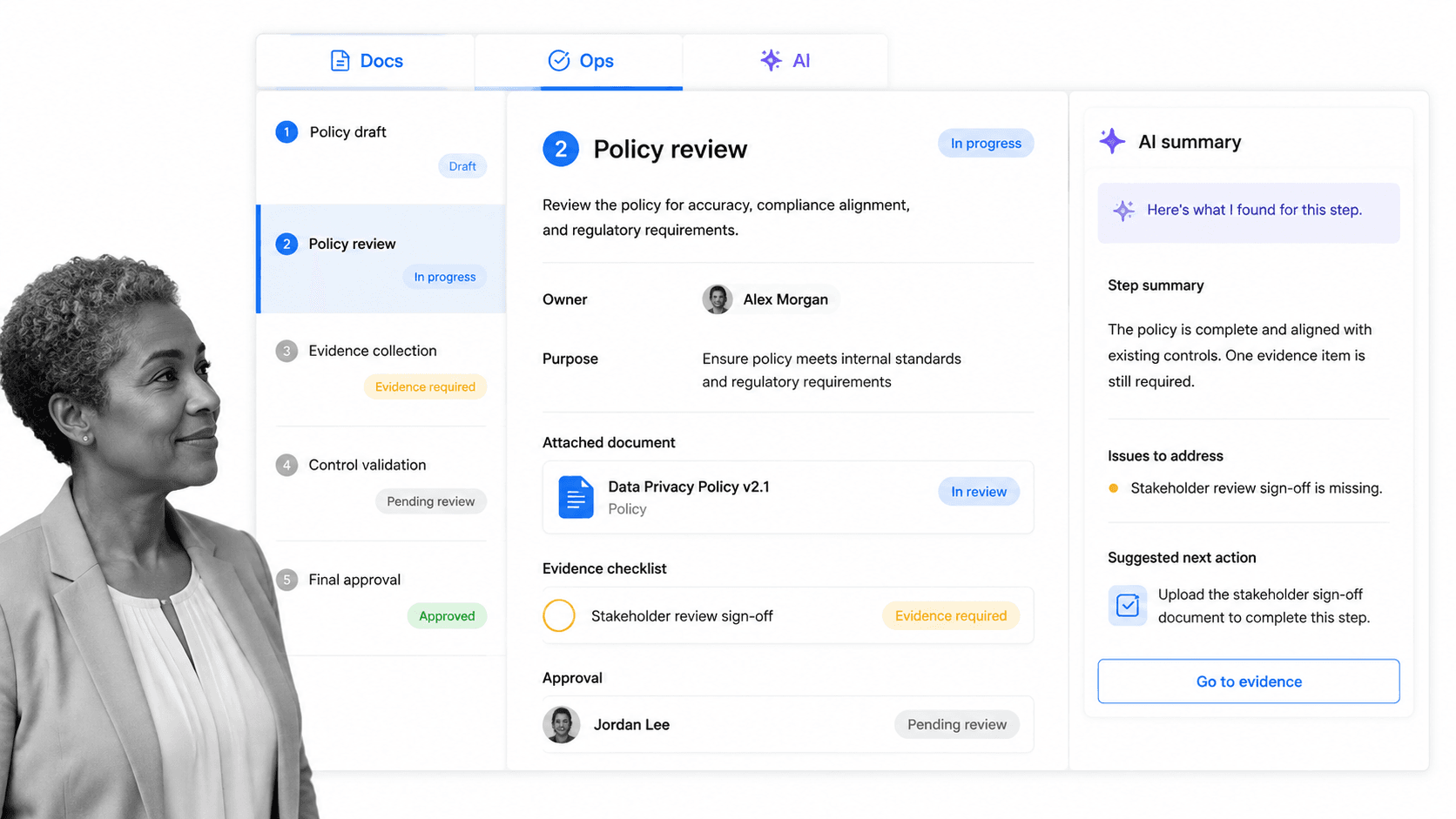
Process Street is not a generic file repository. It is a Compliance Operations Platform for teams whose documents are policies, SOPs, forms, checklists, approvals, and recurring procedures that must be followed consistently.
Process Street is a single product with Docs and Ops capability areas plus built-in AI. Docs helps teams create, govern, and maintain operational documents. Ops turns those documents into workflows that assign tasks, collect data, route approvals, and generate audit-ready records.
This matters when a document is not finished once it is stored. A policy may need acknowledgement. An SOP may need to trigger a weekly inspection. A vendor onboarding checklist may need approvals, evidence, and handoffs across finance, legal, and operations. Process Street connects the document to that execution trail.
The platform also supports integrations with thousands of apps, so document-driven workflows can push data into the systems teams already use. It is strongest when governance and action need to live together.
- Best for: Compliance operations, SOPs, policy acknowledgement, approvals, and recurring document-driven workflows.
- Strengths: Docs and Ops in one product, workflow execution, approvals, audit trails, forms, role assignments, built-in AI, integrations.
- Watch out for: It complements cloud storage rather than replacing every file repository use case.
Dropbox Paper
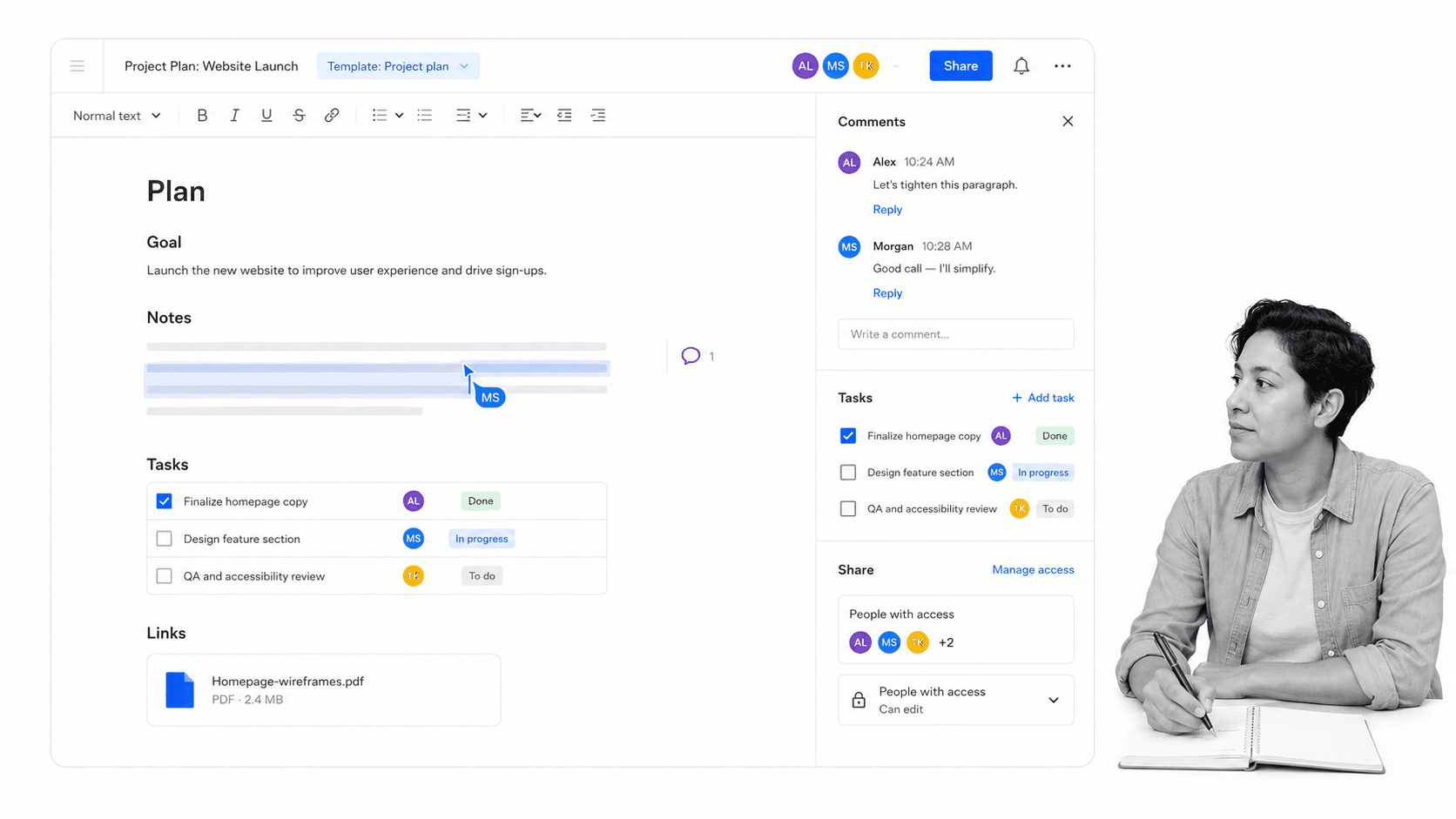
Dropbox Paper is a collaborative document workspace tied to Dropbox. It is useful for project notes, meeting docs, lightweight briefs, task lists, embedded media, and team brainstorming.
Paper is not a full document management platform in the same sense as SharePoint, Revver, or a regulated document control system. Its value is in making shared documents easy to create, discuss, and connect to files that already live in Dropbox.
For teams that use Dropbox as their primary file layer, Paper can be a clean way to turn folders into working documents. For teams that need advanced records management, retention policies, or compliance workflows, it will usually need to sit beside stronger governance tools.
- Best for: Lightweight collaborative docs for Dropbox-based teams.
- Strengths: Simple co-editing, task lists, media embeds, connection to Dropbox files.
- Watch out for: Limited as a standalone DMS for regulated or document-control-heavy work.
Microsoft SharePoint
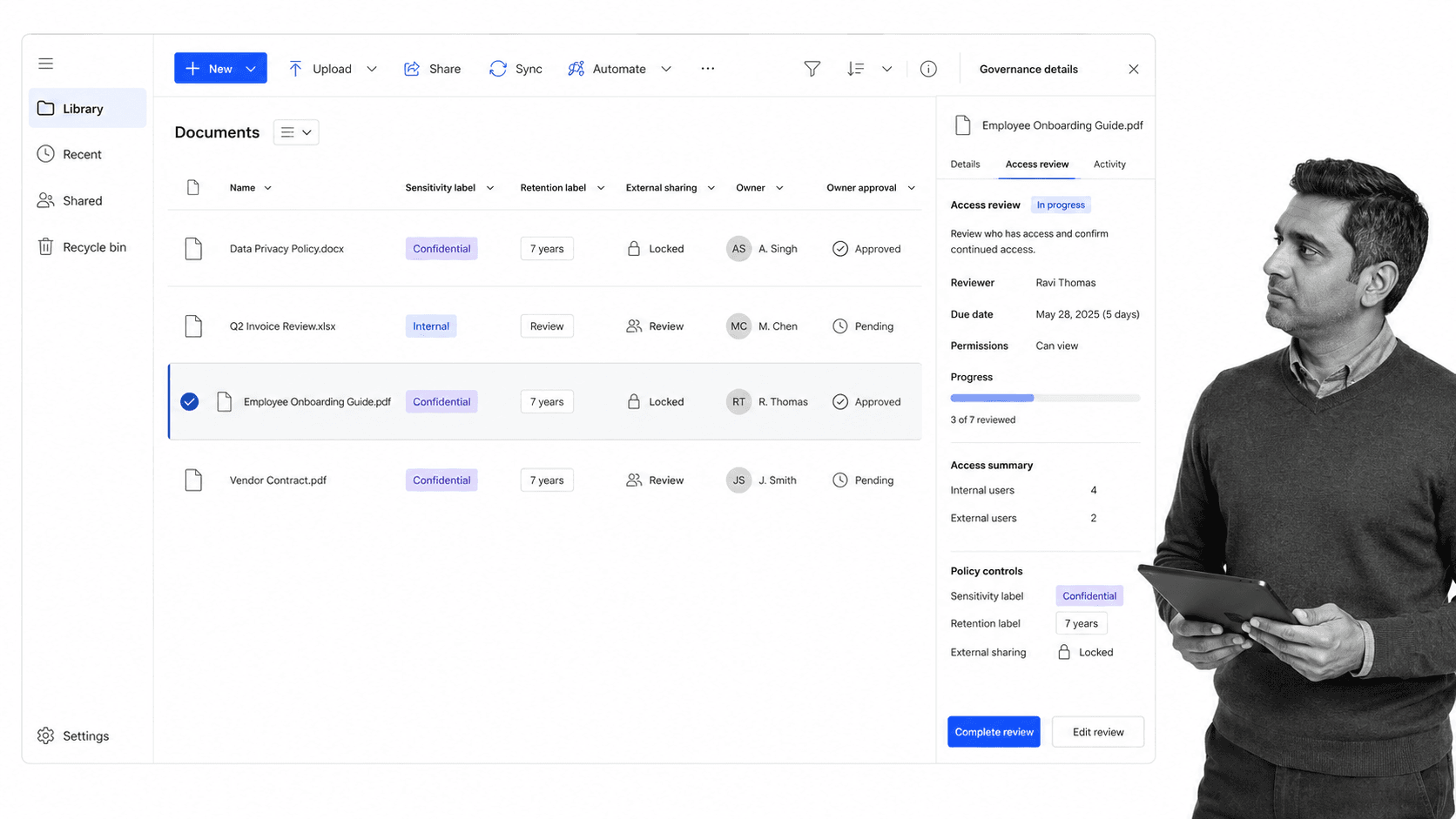
Microsoft SharePoint is the enterprise document management and intranet backbone for many Microsoft 365 organizations. It supports document libraries, metadata, versioning, permissions, pages, lists, search, retention policies, sensitivity labels, and integrations across Teams, OneDrive, Power Automate, and Microsoft 365 administration.
SharePoint is powerful because it can serve as more than a file system. It can structure departmental portals, connect documents to business processes, and apply enterprise governance controls at scale.
The tradeoff is complexity. SharePoint works best when someone owns the information architecture, permissions model, metadata strategy, and lifecycle rules. Without that governance, it can become a sprawling repository that users avoid.
- Best for: Microsoft 365 organizations that need enterprise content management.
- Strengths: Document libraries, metadata, versioning, retention, Teams and OneDrive integration, enterprise admin controls.
- Watch out for: Requires thoughtful setup and ongoing governance.
Quick comparison
| System | Best fit | Primary strength |
|---|---|---|
| Zoho WorkDrive | Zoho ecosystem teams | Shared team folders and collaboration |
| Revver | Document-heavy client services | Secure document workflows and e-signatures |
| Google Drive | Google Workspace teams | Fast collaboration and search |
| Process Street | Compliance operations and SOP execution | Governed Docs plus executable Ops workflows |
| Dropbox Paper | Dropbox-based collaborators | Lightweight shared documents |
| Microsoft SharePoint | Microsoft 365 enterprises | Enterprise content management and governance |
Detailed feature notes for the systems compared
The systems compared here overlap in familiar areas: folders and subfolders, advanced permissions and sharing, tags and search, live collaboration with comments, edits, and viewers, version control, mobile apps, desktop access, cloud-based storage, admin permissions, external sharing, and the ability to upload files, images, videos, spreadsheets, presentations, contracts, invoices, and customer information.
Zoho WorkDrive carries forward much of what teams liked about Zoho Docs. Writer, Sheet, and Show still draw parallels to Google Docs, Sheets, and Slides, and teams can create text documents, spreadsheet documents, and presentation documents without leaving the Zoho environment. Admins can manage document related permissions for teams and individuals, use search and tags, support mobile devices, Windows, and Mac, and connect documents to Zoho integrations, backups, reporting, and email-based workflows.
Revver keeps the eFileCabinet focus on large client facing businesses, agencies, and offices moving away from filing cabinets full of invoices and sheets of paper. The product category is about keeping client information centralized between office locations, processing contracts, archiving customer information, and sharing files with clients securely. Important features include drag and drop file storage, a SecureDrawer-style client sharing portal, alerts, Outlook and MS Office integration, QuickBooks integration, eSignature integration, attachments, automatic backups, Word and Excel document creation, regulatory compliance, and related customer documents.
Google Drive remains a solid DMS for creating, tracking, and collaborating over documents. It is often thought of as a cloud drive first, but it contains many dedicated document management features: folders and subfolders, Google-quality search, save Gmail attachments to Drive, filter by date modified or people collaborating, and extensive add-ons. Google Workspace, previously G Suite and before that Google Apps for Work, also packages Gmail, Calendar, Drive, Docs, Sheets, Slides, Forms, Sites, and Vault, so admins get a company dashboard instead of relying on everyone using personal free accounts. Third-party tools such as diagrams.net, Kanbanchi, and Pixlr show how Drive can stretch into diagram editing, project management, and photo editing.
Process Street is strongest when teams do not just store SOPs, but execute and track SOPs as runnable workflows. It can handle client onboarding, setting up a new IT system, recurring inspections, employee onboarding, and approval-heavy procedures. Useful capabilities include unlimited workflow runs, uploads for files, images, and videos, enterprise-grade security, forms, form fields, a dashboard for completion tracking, CSV-style views of captured data, member assignments, guests, folder permissions, revision activity, and integrations with other apps.
Dropbox Paper is useful for internal documentation and collaborating over drafts. It supports common document elements such as an image, Dropbox file, table, bulleted list, numbered list, checkbox, divider, and code block. Because Paper is block-based, teams can create well-formatted documents quickly, add comments, suggestions, and edits, collaborate in real time, search folders and subfolders, add code, checklists, images, and videos, and reference Dropbox files in-line without messy formatting.
SharePoint takes document management further into intranet and enterprise content management. It can host team sites, web pages, an internal wiki, document libraries, lists, and business processes. Microsoft estates may still contain terms such as Access Services, SharePoint 2013 Workflow, Enterprise Search, E-discovery, ACM compliance, Excel Services, Visio Services, InfoPath Forms Services, and Business Connectivity Services. The current value is the same theme: a huge developer ecosystem, Office suite integration, locally synced or online Office files, and support for more than a simple DMS.
Implementation and pricing questions to ask
Before choosing, ask whether the system needs to be self-hosted or cloud-based, whether it has live collaboration, whether versioning is strong enough, how good the search is, and what the permissions and sharing settings allow. Also check storage space per user, member and guest rules, per user per month costs, quote requirements, backup options, reporting, regulatory needs, integrations, and whether the cheapest plan includes the features your team actually needs.
Teams comparing cost should look beyond the monthly price. A tool can look inexpensive but require extra admin work, training, add-ons, or manual filing habits. Another tool can look expensive but save money if it prevents duplicate documents, missed approvals, poor archiving, or insecure client sharing.
For a final at-a-glance check, look for the stand-out feature that matters most: a fully functional platform, a lightweight solution, a massive library of add-ons, native integrations, a client sharing portal, a public website or intranet layer, Office 365 and Office suite fit, unlimited storage, or a package including the collaboration apps your team uses every day. If SharePoint is too extensive for the job, compare SharePoint alternatives before paying between plans or running software you do not need.
Which document management system should you use?
Choose the system that matches the risk level around your documents. A marketing team drafting campaign briefs may only need Google Drive or Dropbox Paper. A professional services firm managing client records may need Revver. A Microsoft 365 company with enterprise governance requirements may choose SharePoint. A team that needs SOPs, approvals, audit evidence, and recurring compliance work should evaluate Process Street.
The right DMS is less about where files sit and more about whether the organization can find, trust, approve, and act on the right version at the right time.
The post 6 Top Document Management Systems Compared first appeared on Process Street | Compliance Operations Platform.






0 Commentaires