Every manager faces the same question: How do I improve the way my business works? A well-designed process turns that question into repeatable action. An automated process lets software complete predictable steps with little or no human intervention. An interactive process combines that automation with human decisions, approvals, conversations, or exception handling.
The difference is not simply people versus software. It is about assigning each part of the work to the right operator. Rules-based, repetitive work is a strong candidate for automation. Work that depends on judgment, context, creativity, or trust should remain human-led. Most important business processes sit somewhere between those two ends.
This guide looks at three practical models:
- Human-driven processes
- Automated processes
- Interactive processes that combine the two
The goal is to understand what each model does well, where it can fail, and how to design a process that makes the best use of both human expertise and software speed.
Employing processes within your team
What is a process? A process can be generally defined as the series of steps which need to be followed to complete a task. That definition is simple, but the value comes from making the steps visible and repeatable.
Operating with a process increases productivity, helps organize workflows across the company, and increases employee accountability. Standardized processes also make sure that quality is consistently high by making sure best practices are always followed and optimized over time.
At Process Street, we create a process every time we have a task which we need to do more than twice. Repeatable tasks need processes to make certain the task is completed to the highest standard every time. Certain processes which are highly repeatable can be automated, fully or partly, but sometimes a process has to revolve around the individuals undertaking it.
When to take a human-oriented approach
Consider a blog pre-publish process. A checklist can guide an editor through every required step, but many of those steps still depend on human skill. The public template below shows a compact version of that workflow.
It could be big things like checking for filler words and style, undertaking keyword research, or using bolding to make a post scannable. Or it could be small things like checking that alt tags on images contain a useful description, checking title and subtitle capitalization parameters are met, and correctly categorizing the article.
The vast majority of tasks within this process are tasks which are better done by a person. They are tasks which require research, scrutiny, and creativity. Software can present the right information, enforce required fields, detect omissions, and route the draft. It cannot own the editorial judgment behind the finished article.
The same distinction appears in customer service. A system can collect account details, classify a request, show the relevant policy, and make sure a response deadline is visible. A support specialist still needs to understand what the customer is trying to achieve and decide whether the standard answer fits. In hiring, software can schedule interviews and route scorecards, but a hiring team must assess evidence, probe inconsistencies, and make a considered choice.
Well-documented human-focused processes:
- Can be more flexible than fixed automated processes.
- Utilize the wealth of expertise your employees bring to the company.
- Are important for personal interactions with customers and clients.
- Can be improved in creative ways through employee suggestions from engagement with the process.
Processes centered around laying out standard operating procedures for your employees are useful in cases like content creation, sales, customer service, hiring, incident response, and other work where context matters. Processes like these are best allocated to people and can be used to guide the strengths of your employees. These kinds of processes help your employees focus on what they are best at.
Documentation is what makes that balance possible. Without clear steps, automation has nothing stable to support and employees have no common baseline. A documented process does not need to dictate every word or decision. It can define the required outcome, the information a person must consider, the controls that cannot be skipped, and the points where professional judgment begins.
Automated processes and where to find them
Process automation is the use of technology to undertake and complete workflows without the need for human intervention. It can be the key to getting more done. The best candidates are high-volume tasks with clear inputs, stable rules, and predictable outcomes.
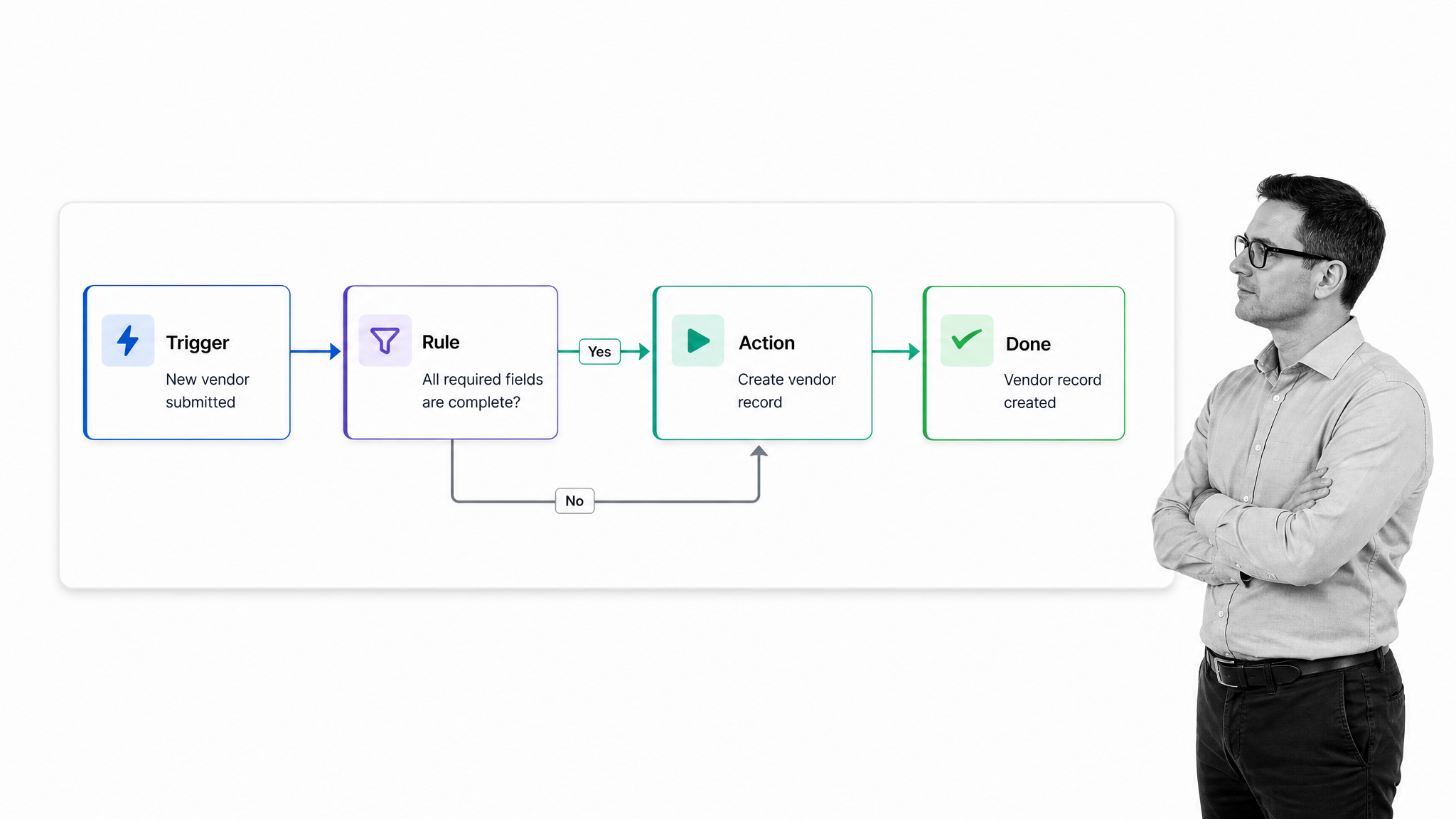
Manufacturing made this pattern familiar, but automation is now common in every business function. An incoming form can create a record. A completed task can notify the next owner. A due date can trigger a reminder. A status change can update another system. Modern automated workflow software makes these patterns available to teams without requiring them to build every connection from scratch.
Automation has expanded beyond fixed scripts. In its 2025 research on people, agents, and robots, McKinsey estimated that current technologies could theoretically automate activities representing about 57% of US work hours. The same research found that more than 70% of sought-after skills apply across both automatable and nonautomatable work. The implication is important: organizations need better partnerships between people and technology, not a simple plan to remove people from every process.
Third-party automation tools like Zapier, IFTTT, and Microsoft Power Automate can be used to automate administrative tasks and many aspects of communication, amongst other things. The names of the tools matter less than the operating pattern: one event starts a predictable sequence, rules decide what happens next, and the system records the result.
How to automate a common marketing workflow
Inbound marketing and email campaigns show how automation can work outside a technical department. Using marketing automation software such as Keap, ActiveCampaign, Drip, or Ortto, a team can build a campaign in advance and let the platform run the repeatable parts.
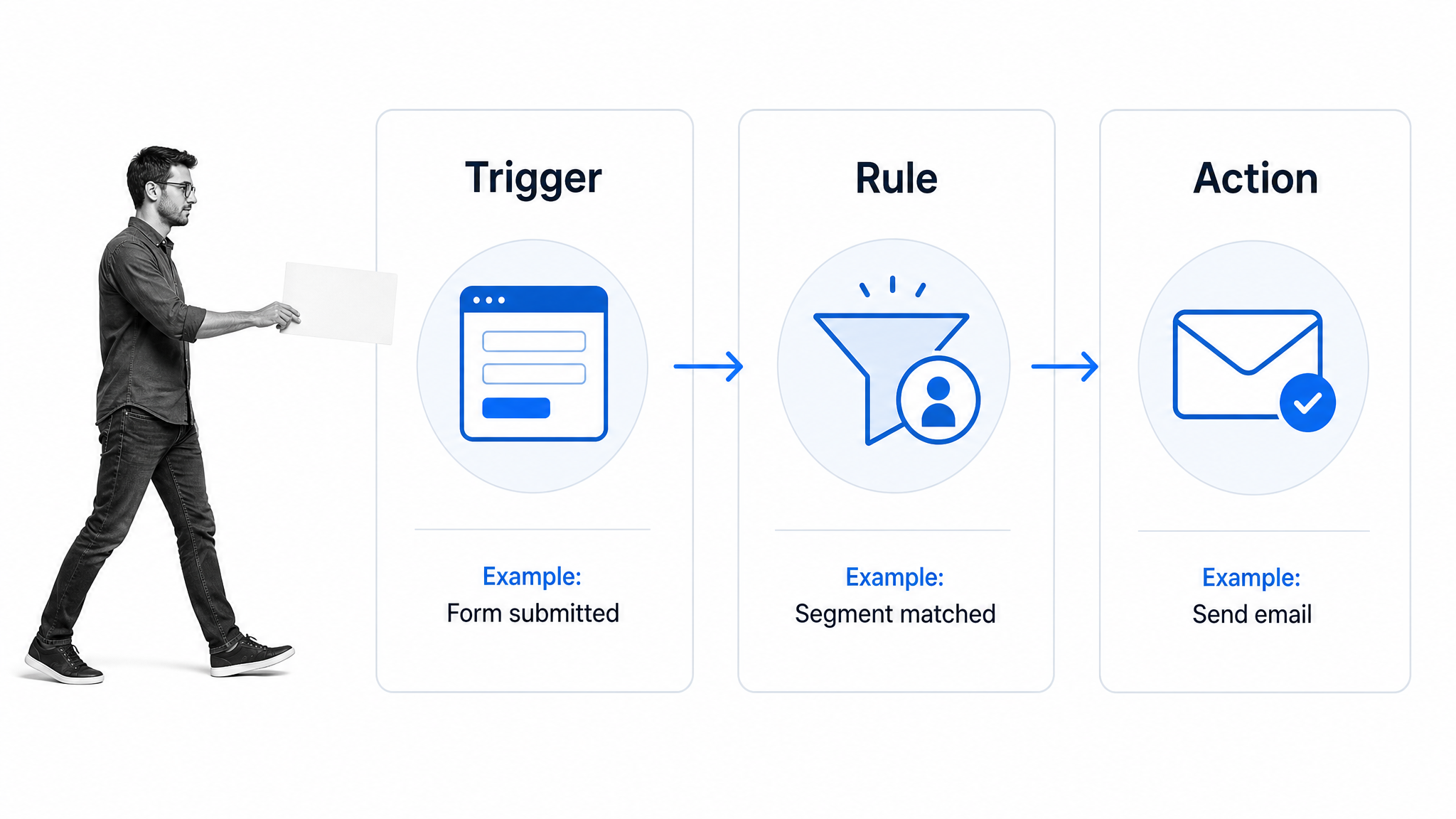
Once someone signs up through a form, their details can be automatically pulled into a contacts list and tagged on the basis of their actions. Platforms like these may also enrich or validate information, but the team should ask only for data it needs and can use responsibly.
Once you have a user in your platform, they can begin their email journey. You can design a customer journey which sends them a preset series of emails. You can put time delays between each email to tailor your approach, plus add logic to the journey whereby the follow-up email the customer receives depends on how they interacted with the previous one.
If someone has signed up to subscribe to your blog and clicked a button in one of your initial emails to access an e-book or some extra content, you could segment them to receive a sales email at that moment or the next day. Through this approach of segmenting your subscribers, you can qualify potential leads and send an automatic notification to your sales representative. The representative receives the context needed for a personal conversation instead of spending time copying data between systems.
Timing and consent also belong in the design. A nurture sequence needs clear entry and exit conditions, suppression rules, and a way to stop messages when a person unsubscribes or moves into a different lifecycle stage. Those controls prevent a technically correct automation from creating a poor customer experience.
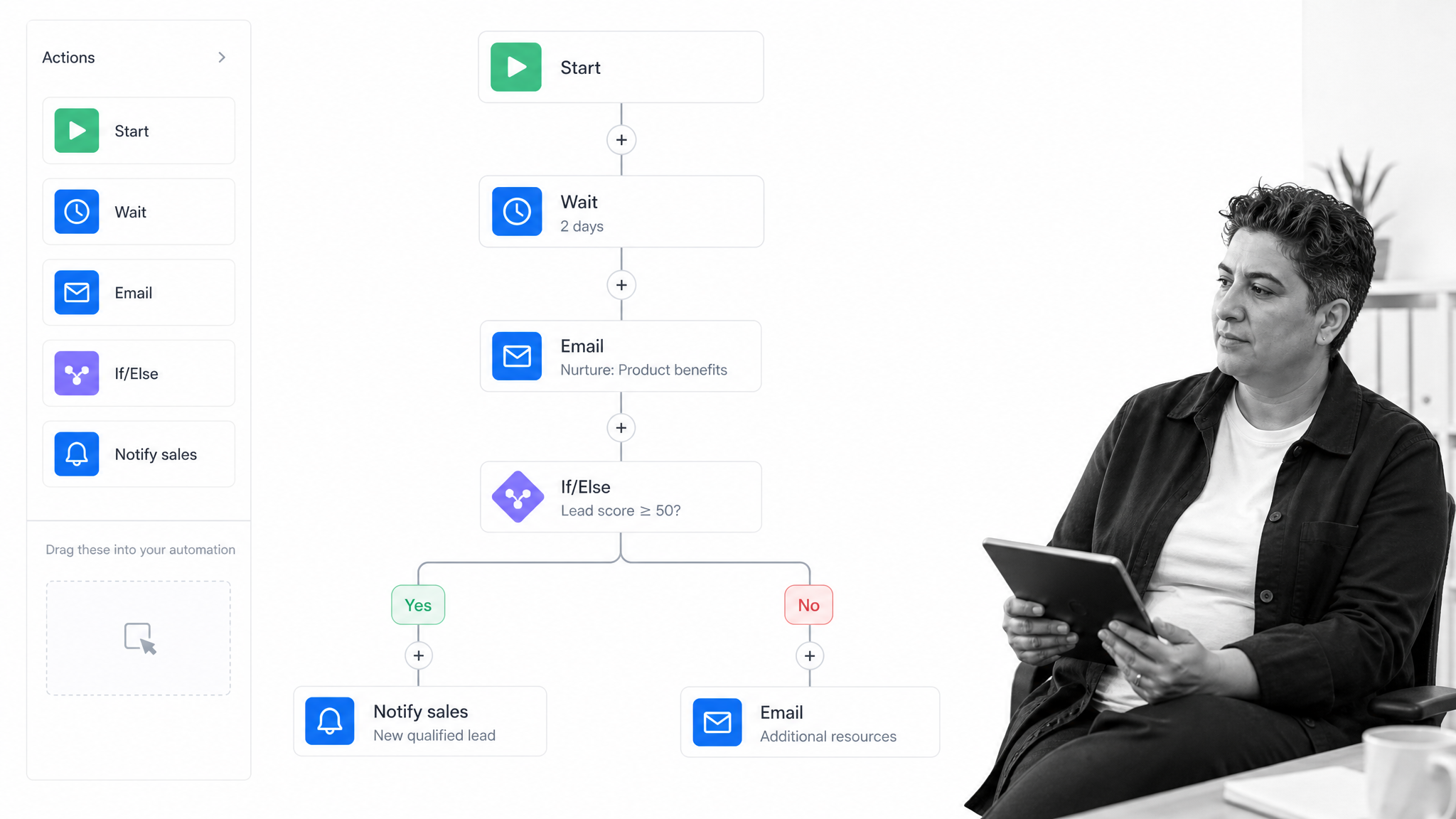
The automated process does not decide the business strategy. A marketer still chooses the audience, message, qualification criteria, timing, and stop conditions. Once those decisions are encoded, the system can execute the routine path consistently at a scale that manual handling cannot match.
Automated processes provide:
- One-time setup and execution.
- A way to avoid wasting time on repetitive tasks.
- Standardized approaches for consistent quality and performance data.
- Faster handoffs between systems and teams.
- A scalable process which can handle many requests all at once.
Those advantages depend on the process being suitable for automation. A poorly defined rule will produce the wrong result more quickly and more consistently. The process needs clear ownership, monitoring, and a path for exceptions.
Before automating a task, watch how it is performed today. Look for variation in inputs, hidden decisions, workarounds, and failure points. If experienced employees regularly pause to interpret a situation, the task probably needs an interactive design. If the same input reliably produces the same safe outcome, full automation may be appropriate.
How to build interactive processes
Fully human-driven and fully automated processes are both useful. Interactive processes combine their strengths. They integrate employees’ expertise and software’s lifting power. This enables a team to keep the benefits of customer-facing friendliness and employee creativity while also cutting out the waste in between.
The defining feature is communication between the person and the system. A workflow presents information at the right moment, the person adds judgment or makes a decision, and the system uses that input to continue. That exchange can happen many times inside one process.
For instance, a connector might send survey data straight to a Google Sheet or Excel sheet. The automation has communicated data over to another area or person. In the same way, when a person is plugged into these automated processes, they are utilized best when that individual is communicating something important back to the automations. In this sense, automation tools within business processes become a communication tool between the person running the process and the machines doing the lifting for them.
Microsoft’s current guidance distinguishes attended automation from unattended automation. Attended automation works with a person in the loop, while unattended automation runs without someone actively driving each step. Approval flows are a common interactive pattern: the system gathers the request, sends the right context to a reviewer, records the decision, and routes the next action.
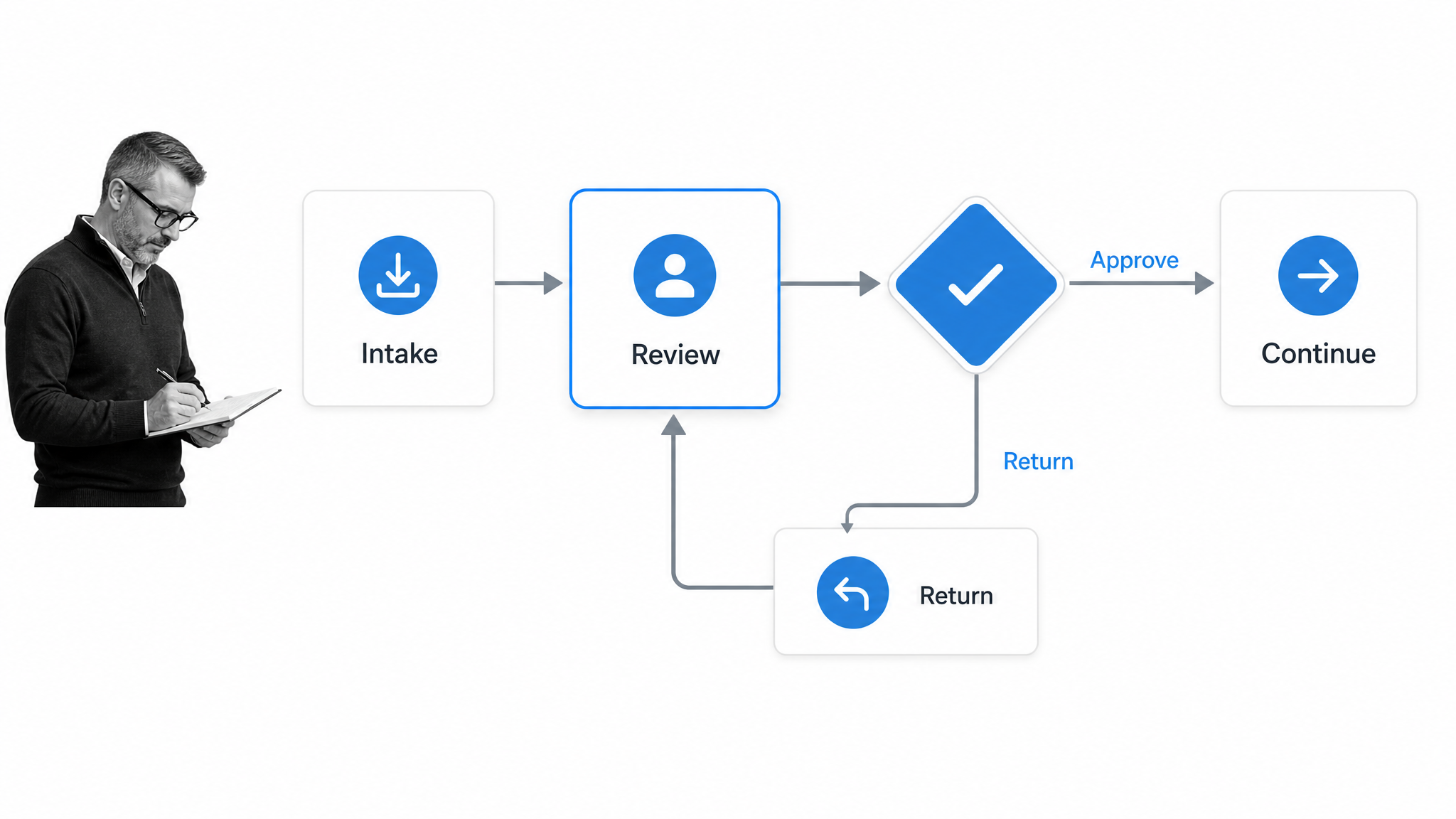
A good interactive process makes the boundary explicit. It tells people when they are expected to act, what information they need, what options are available, and what the software will do after their decision. It also defines what happens when information is missing, a deadline passes, or the case falls outside the normal rule.
Visibility is essential. The person should be able to see why a task reached them, what has already happened, and what their choice will trigger. The system should capture the decision and its supporting information in a form that can be reviewed later. That shared context prevents the process from becoming a series of opaque handoffs.
Interactive processes in the AI era
Interactive automation is increasingly important as AI agents take on more work. An agent can summarize a case, extract information, draft a response, or recommend a next step. A person may still need to review the evidence, judge the risk, approve the action, or handle an exception.
The correct dividing line depends on predictability and impact. Low-risk work with stable rules can run automatically. Ambiguous or high-impact work should have a review point. A mature process can change the level of supervision according to confidence, risk, or the type of case instead of treating every task the same way.
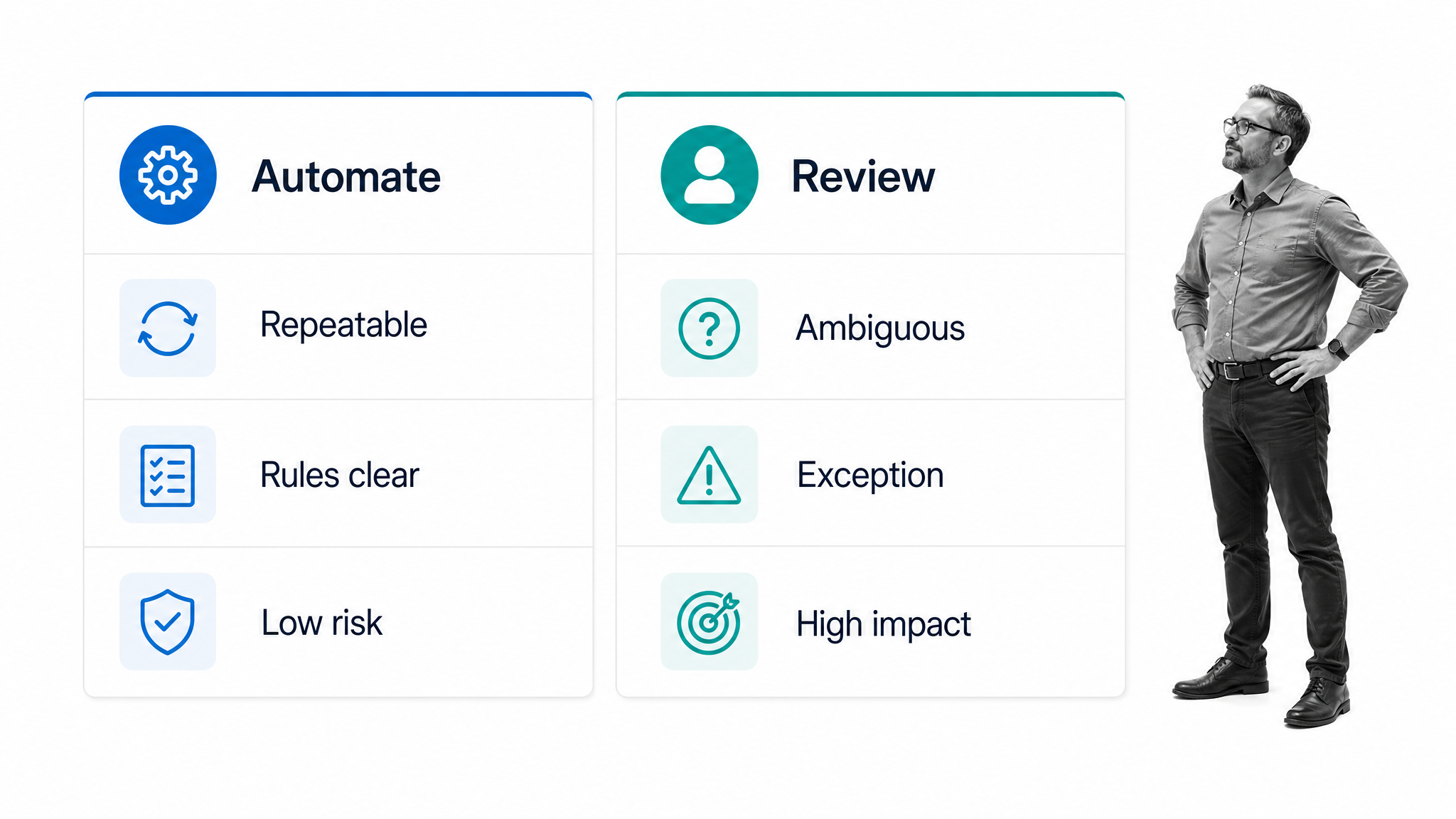
This model also creates better feedback. When people correct an output or return a case, the process can capture why. Teams can use that record to improve instructions, rules, training, and controls. Human review is not merely a safety brake; it is one way the process learns where automation works and where it does not.
Review points should be purposeful. Requiring approval for every routine action can create queues without improving quality. A better approach is to reserve human attention for exceptions, low-confidence outputs, sensitive decisions, or cases above a defined risk threshold. The process can let ordinary work continue while escalating the cases that genuinely benefit from expertise.
How to properly execute interactive processes
One internal process which mirrors these requirements is a BANT sales qualification process. This is an approach which seeks to determine the suitability of a lead for a product or service. The aim is to reduce time spent on low-quality leads, improve conversions, and provide the service most tuned to the client’s needs.
The BANT methodology stands for:
- Budget. What is the prospect’s budget?
- Authority. Does the contact have the right authority to buy?
- Needs. What needs does your prospect have? Do they match your product or service?
- Timeframe. How soon are they wanting to implement a solution?
When talking with a client, a representative needs to assess each of these categories and record the information. The way the team records this information determines how useful it can be, and the way the process is followed determines how efficient the qualification process can be.
A workflow can guide the representative through each topic, require the right information, and keep the sequence consistent. Rules can flag missing answers, route a qualified opportunity, create a follow-up task, or notify a manager. The person owns the relationship and judgment; the system owns structure, routing, and records.
Processes like these bring the best out of interactive potential. A real person can communicate with customers, presenting a human face to the company, while the software organizes the administrative elements, parses the data, and makes the information actionable. Instead of messing around with repetitive administrative tasks, the sales team can focus on what they do best: talking to clients and engaging with their needs.
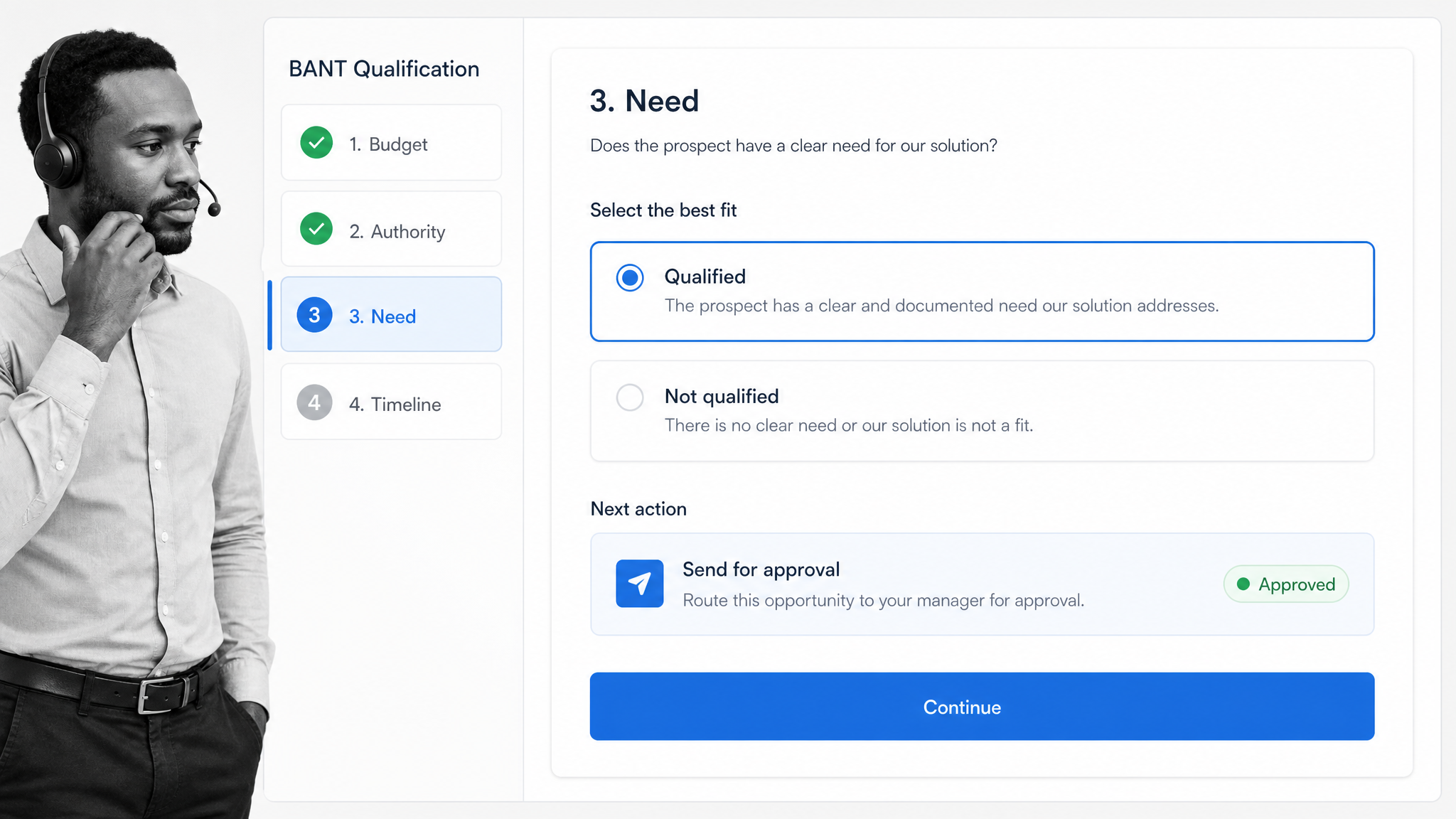
The template below provides a BANT sales qualification process that can be adapted to a team’s own criteria and handoff rules.
An earlier implementation connected Process Street and Close through Zapier. Product interfaces and labels evolve, but the underlying pattern remains useful: complete a human-led qualification step, record the result, and let an integration move the structured data to the next system.
When building an interactive process, start with the outcome and work backward. Mark each step as human, automated, or shared. For every handoff, define the trigger, required context, owner, time limit, next action, and exception path. Then test the workflow with real cases before increasing the degree of automation.
Measure the process as a whole rather than optimizing one automated step in isolation. Useful signals include completion time, rework, exception volume, missed deadlines, customer outcomes, and the number of times a person overrides the suggested path. Frequent overrides may show that the rule is incomplete or that the work should remain human-led.
Combine human expertise with software power
Whatever the terminology you want to employ when discussing processes, there is significant potential for increasing the efficiency of your operations and raising the standards of your results. Automated processes are good at speed, consistency, and scale. Human-driven processes are good at judgment, creativity, and relationships. Interactive processes let each side do the work it handles best.
Just because you can doesn’t mean you should. Automating a step is worthwhile when it removes friction without weakening the outcome, control, or customer experience. If a decision is ambiguous, high impact, or dependent on trust, design a visible human checkpoint.
Finding the right balance within your internal processes is one of the key challenges of designing processes which fit the needs of the business. It is up to you as a manager to determine when a process should be fully automated and when you should keep it interactive with a human touch.
Process Street is a single Compliance Operations Platform with Docs and Ops capability areas plus built-in AI. Teams can document how work should run, execute it as structured workflows, automate repeatable steps, keep people in control of decisions, and create evidence that the process was followed.
The strongest process is rarely the one with the most automation. It is the one that gives people the context they need, gives software the rules it can execute reliably, and makes every handoff clear. That clarity is what turns a process from documentation into dependable execution.
The post An Introduction to Automated and Interactive Processes first appeared on Process Street | Compliance Operations Platform.


0 Commentaires