Enterprise content management (ECM) is the combination of strategy, processes, and technology used to capture, organize, secure, retain, find, and deliver an organization’s content. An ECM system gives documents and other business information a governed lifecycle instead of leaving them scattered across inboxes, shared drives, local folders, and disconnected apps.
Good ECM does more than store files. It makes the current version clear, controls who can access it, applies retention rules, connects content to the work it supports, and leaves evidence of what happened. This guide explains the definition, benefits, capabilities, limits, software choices, and the role Process Street can play around an enterprise content system.
- What is enterprise content management?
- Why is enterprise content management useful?
- What can enterprise content management tools do?
- What can’t enterprise content management tools do?
- Which enterprise content management tools should you consider?
- How can Process Street strengthen enterprise content management?
What is enterprise content management?
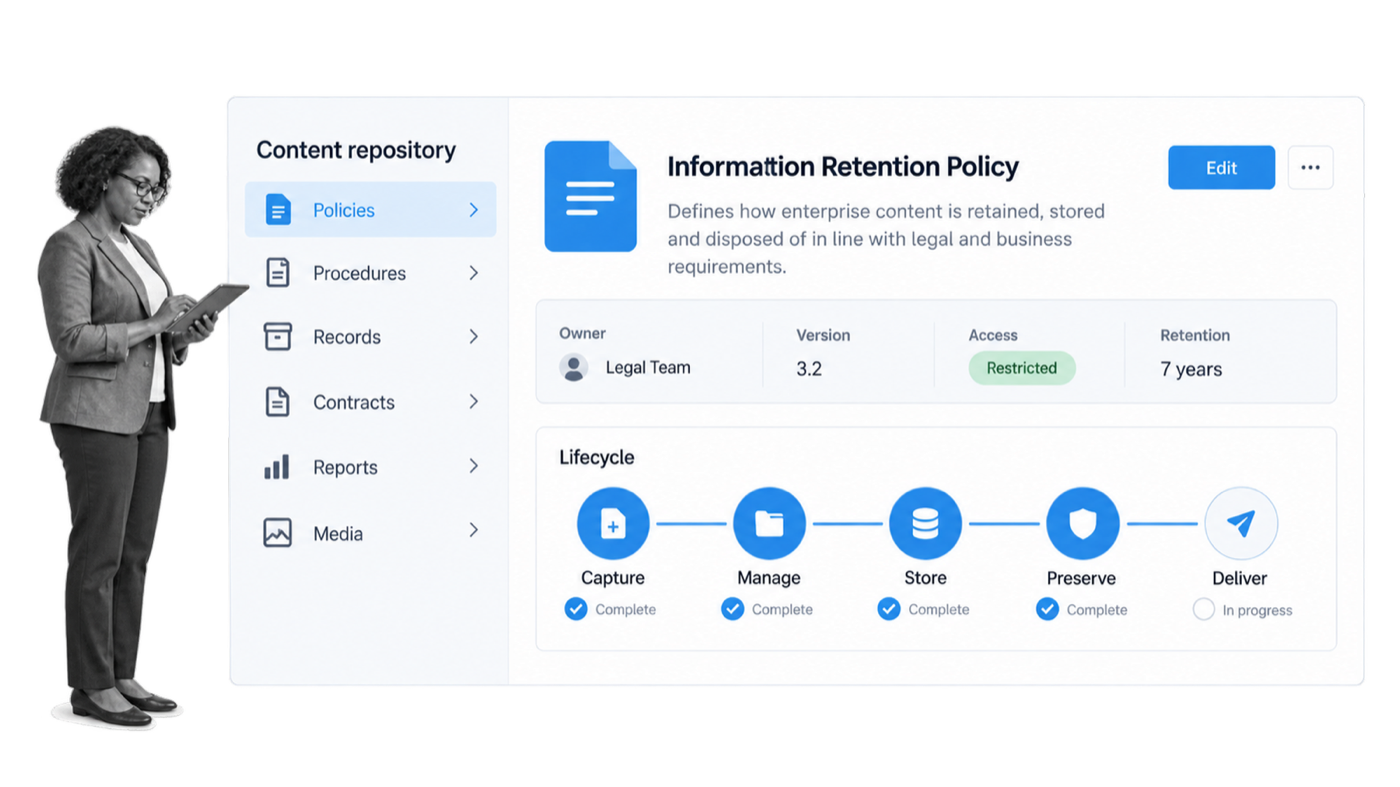
Enterprise content management is an umbrella term for the methods, tools, processes, and systems used to keep business content safe, usable, accessible, and controlled throughout its life cycle. Content can include policies, contracts, invoices, images, emails, research, customer records, working documents, and the evidence created while a process runs.
TechTarget’s current ECM guide describes the category as the processes, strategies, and tools businesses use to obtain, organize, store, and deliver critical information. That definition matters because ECM is not only a software purchase. It is an operating model for information.
The category began with document imaging, capture, and storage. It expanded as organizations needed to manage email, digital records, collaboration, web content, and content connected to business processes. Modern platforms increasingly use the language of content services, intelligent document processing, enterprise search, and AI-assisted classification. The vocabulary has changed, but the core job remains consistent: put important content under deliberate control.
A useful ECM program answers practical questions. Where does an authoritative document live? Who owns it? Which version is current? Who may view or change it? How long must it be kept? What happens when a retention period ends? Which process uses it? Can the organization show an auditor or customer what happened?
That is why ECM is broader than a folder structure. A shared drive may provide storage, but storage alone does not establish ownership, metadata, retention, legal hold, approval, disposal, or an auditable connection to operational work. ECM brings those decisions into one governed system.
ECM and adjacent content systems
Document management, digital asset management, records management, web content management, knowledge management, and collaboration platforms overlap with ECM, but they emphasize different jobs. Document management focuses on working files and document controls. Digital asset management specializes in rich media and brand assets. Records management focuses on trustworthy retention and disposition. Web content management publishes digital experiences. Knowledge management helps people find and reuse organizational know-how.
An enterprise may use one broad platform or several connected systems. The ECM strategy should define which system is authoritative for each content class and how content moves between them. A contract may begin in an e-signature system, become an official record in the ECM repository, and trigger a renewal workflow elsewhere. The architecture matters less than having explicit ownership and a reliable chain of custody.
ECM also differs from a customer-facing content management system, or CMS. A website CMS manages pages and digital publishing. ECM governs internal and external business content across many formats and processes. Some products cover both areas, but the selection criteria and control requirements are not identical.
The five parts of the ECM lifecycle
- Capture: The Capture component involves creating information by converting paper documents into electronic formats, obtaining and collecting electronic files into a cohesive structure, and organizing information. Information can include content such as invoices, contracts and research reports.
- Manage: The Manage component connects, modifies and employs information through means such as document management, collaborative software, web content management and records management.
- Store: The Store component temporarily backs up frequently changing information in the short term within flexible folder structures to allow users to view or edit information.
- Preserve: The Preserve component backs up infrequently changing information in the medium and long term and is usually accomplished through records management features. It is commonly used to help organizations comply with government and other regulations.
- Deliver: The Deliver component provides clients and end-users with requested information.
Consider a redesigned company logo. The file is created and captured, then placed in a controlled library. Designers and marketers need access, while version controls prevent an obsolete file from spreading. The approved version is delivered to websites and campaigns. When the brand changes again, the previous asset is retained or disposed of under policy. The same lifecycle applies to contracts, policies, invoices, and customer records, although the controls and retention periods differ.
ECM is sometimes described as intelligent information management. The important point is not the label. It is whether the organization can govern content from creation through use, preservation, and defensible disposal.
Why is enterprise content management useful?
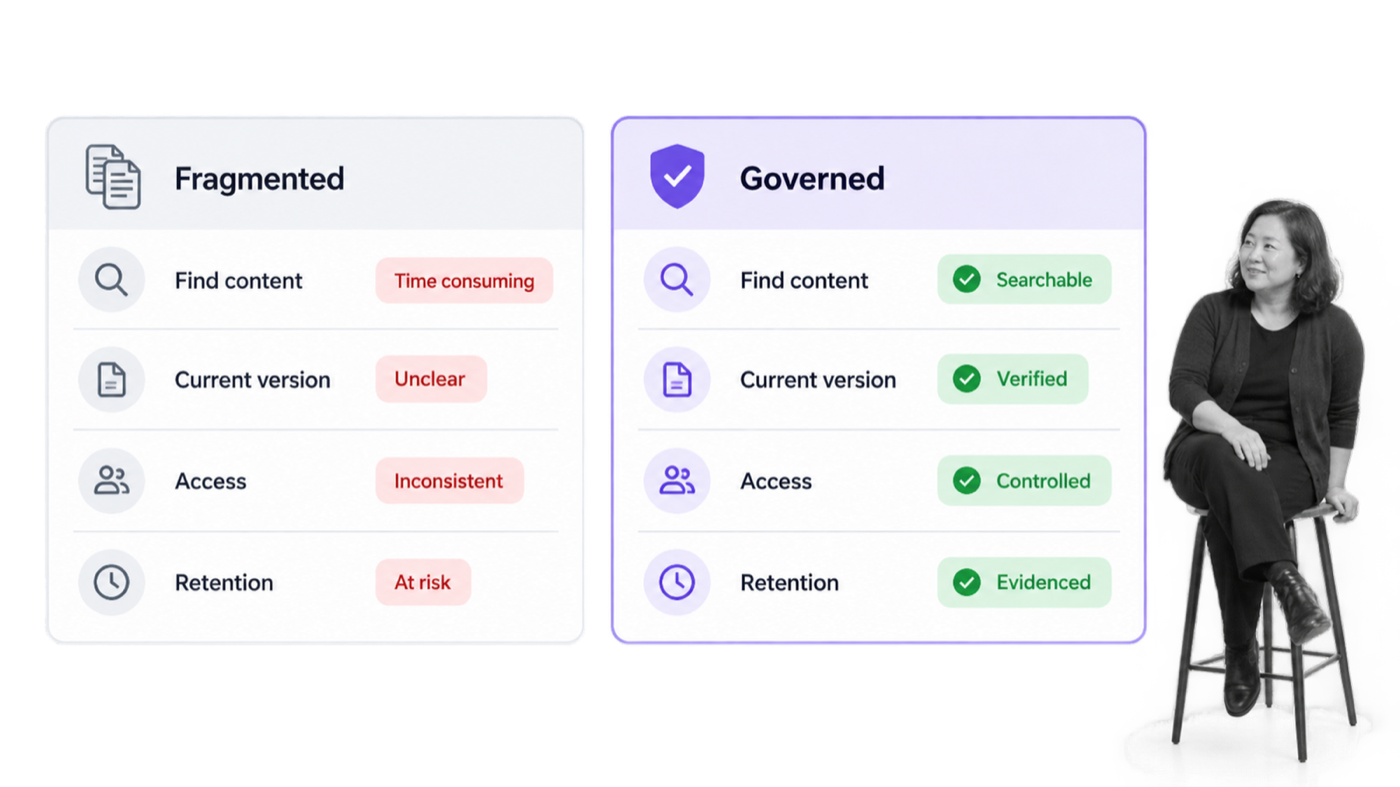
ECM is useful because unmanaged content creates operational friction and risk. People waste time searching, work from outdated files, expose information to the wrong audience, and cannot prove that required records were retained. A governed system gives people a reliable path to the information they need while protecting content that should not be open to everyone.
ECM benefits in daily work
Content, information, and document centralization. One of the largest issues modern businesses face is that they do not use business tools to hold the mass of content they are producing each day, from brand logos to the document with the latest marketing statistics in it. Content that is deemed necessary can be stored in a central location that is used time and time again by employees, so they can retrieve the content they are after. No more trawling through emails or Google Docs. No more awkward Slack messages asking where a necessary piece of content has wandered off to.
Increased productivity. Having documents and information all in one place naturally leads to increased company-wide productivity. For instance, take Felix, a content creator on a hypothetical marketing team. He needs the aforementioned marketing document so he can add some impressive marketing statistics to the content he is creating. Instead of fumbling around various folders, hosted both locally and on the cloud, and delaying his work to boot, Felix knows exactly where to go when everything is in one place. It makes Felix’s workflows, in addition to everyone else’s, more streamlined.
Enhanced accessibility. The accessibility benefits are twofold. It is easier for employees on all levels and in all departments to access what they need, such as when somebody from the accounts team needs to process somebody else’s travel receipts, or when a designer needs to edit a teammate’s initial concepts. The benefits do not end there. With ECM, you are hosting all this business content in one central digital location. This could be either your company’s intranet or a cloud-based tool, but either way, employees can access this central location through an array of devices, from phones and tablets to laptops brought from home and stationary PCs.
Boosted collaboration. When you are managing your enterprise’s content properly, your teams can collaborate like pros. They are able to upload content quickly, see what others have been working on faster, and jump in and make any required edits, changes, or alterations quickly. Version history and approval states keep that collaboration anchored to an authoritative record.
Reduced organizational risk. Data spillage. Information falling into the wrong hands. Documents getting lost in the ether. When it comes to managing your business-related content, keeping it secure and safe is of utmost importance. With the proliferation of bringing different devices in for work, working remotely, and fully remote teams, it is more commonplace to lose sight and track of important business content than ever before. With ECM, you are taking a stand against content mismanagement.
Added eco-friendliness. Businesses should not use outdated methods to manage content, such as storing printed papers in cardboard folders and then storing those folders in stuffy cabinets. That approach is highly impractical and inefficient, and it is not environmentally friendly. Enterprise content management, with its digital-first focus, helps a business reduce unnecessary paper while keeping formal preservation requirements intact.
Centralization without losing control
A central content system reduces the number of places employees must search. Centralization does not mean every person can see every file. A useful ECM design combines a common repository with role-based access, metadata, search, and business rules. People get one dependable starting point, while sensitive records remain appropriately restricted.
This is especially valuable when teams work across offices, time zones, devices, and systems. Employees no longer have to ask which email thread contains the final contract or whether the document in a personal folder is still approved. The content carries its owner, status, version, and access rules with it.
Faster retrieval and better collaboration
Consistent metadata and search make information easier to retrieve. Version history makes collaboration safer because contributors can see what changed and restore a prior state when necessary. Check-in, review, approval, and publishing controls reduce accidental overwrites and stop unfinished content from being treated as final.
AI can improve this part of the lifecycle by extracting fields, suggesting classifications, summarizing content, and helping users find relevant information. Those capabilities work best inside clear permissions, taxonomies, and retention rules. AI does not repair weak governance automatically; it makes the quality of the underlying system more important.
Lower operational and compliance risk
Content often carries obligations. A contract may have a renewal date. A policy may require periodic approval. A customer record may contain personal information. A regulated record may need to be preserved and produced on request. ECM reduces risk by applying access, retention, audit, and disposition controls consistently.
The mortgage loan file is a useful example. A missing form, signature, bank statement, or notarization delays closing. A governed content system can show which documents are present, which are missing, who may access them, and where the file sits in its review state. Hyland’s OnBase overview shows how content, cases, and workflows can be coordinated in document-heavy operations.
Consider a mortgage loan origination file. There is a lot to keep track of in that file. If a form, a signature, a bank statement or a notarization is missing, it is that much longer until close. With ECM, it is easier to track the status of documents, allow immediate access to the people who need it, and keep personally identifying information safe and secure. The same pattern applies to insurance claims, employee records, vendor files, and other content-heavy cases.
More reliable business processes
Implementing ECM forces an organization to define how content should move. Teams must decide which metadata is required, who approves changes, what qualifies as a record, how exceptions are handled, and when information may be destroyed. Those decisions improve the surrounding business processes because the handoffs and responsibilities become explicit.
Implementing enterprise content management is all well and good, but without introducing the new appropriate processes, remapping old processes, and also optimizing them, there is no way ECM can be implemented effectively. Simply put, the organization must redefine the business processes for interacting with business content for the better. Ideally, this will be one of the first steps taken on the enterprise content management journey, not an afterthought once the repository is already full.
The result is not merely a cleaner library. It is a more dependable operating environment. Employees can find what they need, managers can see where content is stuck, and auditors can follow the evidence without reconstructing events from scattered messages.
A clearer content lifecycle
Lifecycle control reduces two opposite problems: content that disappears too early and content that remains forever. An approved policy needs to stay available until it is replaced, while expired working copies should not compete with the current version. A customer record may need restricted access during active use, preservation under a contractual or legal rule, and authorized disposal when that rule ends.
Clear lifecycle states also improve automation. A system can route a draft for review, publish an approved version, notify affected teams, schedule the next review, and later open a disposition task. Each state has an owner and permitted actions. That structure is more reliable than asking employees to remember a series of manual clean-up steps.
More useful evidence for audits and decisions
When content and actions are traceable, teams can answer questions without starting a fire drill. They can show which version was active on a given date, who approved it, which users had access, whether a retention rule applied, and what happened during an exception. The same evidence helps internal improvement because managers can see recurring delays, incomplete metadata, and content classes that generate the most rework.
Better fit for the organization’s actual risk
Not every organization needs the same depth of ECM. A small team with simple records may be well served by a governed cloud content platform. A regulated enterprise may need formal records schedules, legal hold, granular permissions, case management, data residency controls, and extensive integration. The value comes from matching the controls to the content and consequences, not from buying the largest platform available.
What can enterprise content management tools do?
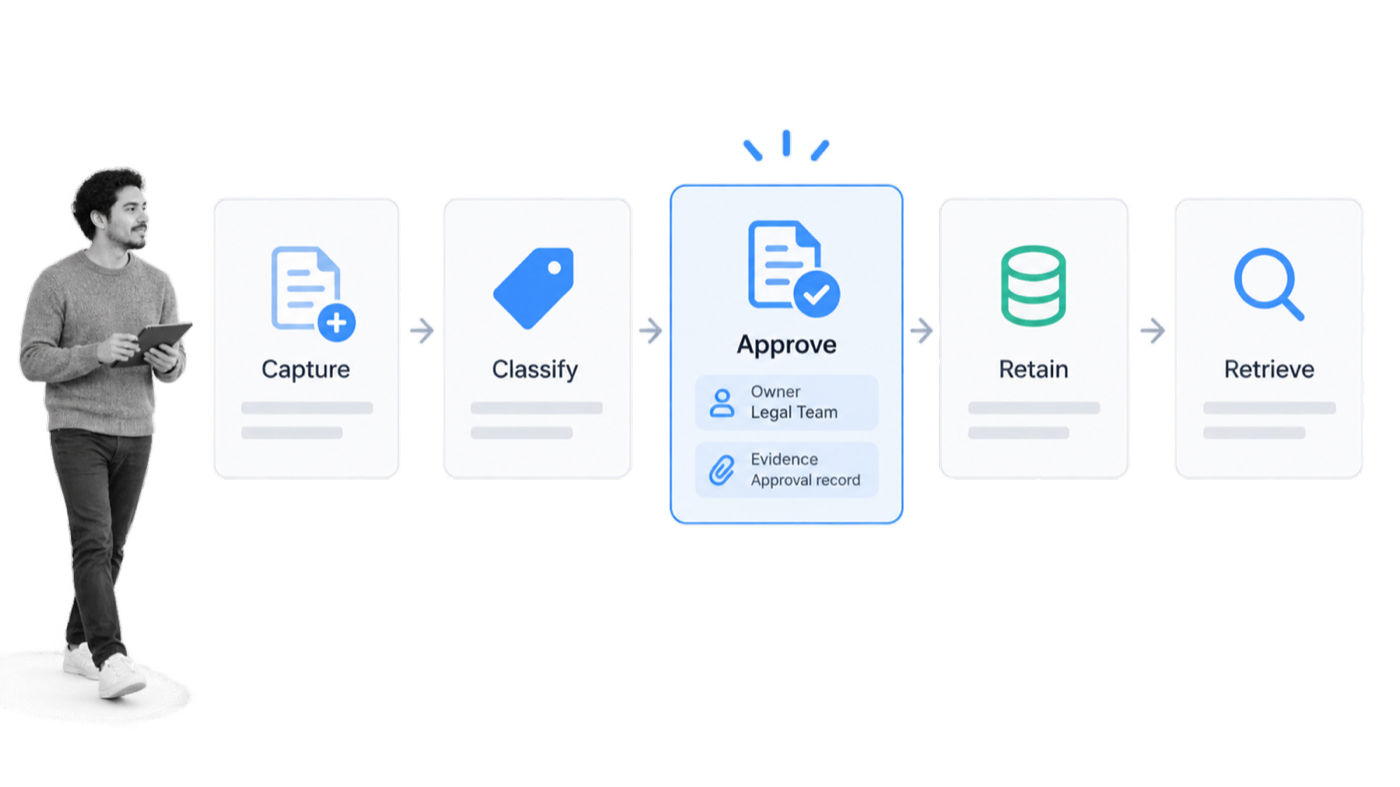
Enterprise content management tools support the content lifecycle from capture through delivery and disposal. The exact feature set varies, but current platforms usually combine repository services, document controls, search, records governance, collaboration, workflow, and integrations. Some specialize in a particular industry or deployment model, while others provide a broad cloud platform.
Capture and classify content
ECM systems can accept files through uploads, scanning, email, forms, mobile capture, APIs, and connected applications. Intelligent document processing can extract fields from invoices, forms, and contracts. Classification and metadata make the content searchable and give downstream rules something reliable to act on.
Capture is more than saving a file. A useful capture process checks quality, identifies duplicates, validates required fields, applies a content type, and routes exceptions to a person. Weak capture produces a repository full of badly named files. Strong capture creates usable information.
For a supplier invoice, capture might extract the supplier, purchase order, amount, tax, and due date, then compare those values with another system. For a signed policy acknowledgement, capture might bind the employee, policy version, timestamp, and signature evidence together. The details vary, but the principle is the same: convert content into a controlled record with enough context to manage it.
Control access, versions, and review
Permissions limit who can view, edit, share, or administer content. Version history distinguishes drafts from approved material and records who changed what. Review and approval states prevent unfinished content from being published or used in a controlled process before it is ready.
These controls matter for everyday collaboration and for formal document governance. A policy owner may draft an update, a subject-matter expert may review it, and an authorized approver may release the new version. The system should preserve the prior version and the evidence of approval.
Access controls should follow roles and content sensitivity rather than being copied casually from old folders. External collaboration deserves special attention. A supplier may need one document in a deal room without gaining access to the surrounding library. Temporary access should expire, sharing should be logged, and the content owner should be able to review who still has access.
Search and deliver the right content
Enterprise search uses names, full text, metadata, relationships, and permissions to return relevant content. Modern systems may add semantic search, summaries, and question-answering. The result still has to respect access controls and identify the source, version, and context. A fast answer from the wrong document is not useful.
Delivery can happen through a browser, mobile app, portal, link, workflow task, API, or connected business system. The objective is to surface the right content where the work happens instead of forcing people to search a separate library every time.
A useful result includes context, not only a file name. The user should be able to see whether the item is current, who owns it, which process it supports, and what restrictions apply. When AI generates an answer or summary, the interface should point back to the governed source so the user can verify it.
Apply retention and records controls
Records controls can apply retention schedules, prevent unauthorized changes, place information on legal hold, and trigger review or disposal when a period expires. The organization should be able to explain why a record was kept, who acted on it, and how the final disposition was authorized.
Retention is not the same as keeping everything forever. Indefinite storage increases cost, discovery burden, and privacy exposure. ECM helps an organization preserve what it must and dispose of what it should under a documented rule.
Disposition should be a controlled decision, not an automatic delete with no review. A record may be eligible for disposal but subject to a legal hold, investigation, customer commitment, or unresolved exception. The system should pause the action, route the case to the right owner, and preserve evidence of the final authorization.
Connect content to workflows and systems
Content rarely operates alone. Contracts connect to procurement and renewal work. Policies connect to training and attestations. Invoices connect to validation and payment. ECM platforms can use built-in workflows, APIs, webhooks, and connectors to move content and metadata between the repository and the systems that perform the work.
Automation is undeniably powerful. Many ECM tools are naturally capable of automation in the application. For instance, a system could automatically convert documents from one file type to another. Similarly, it can automatically route certain files, documents, or pieces of information to certain members of staff exactly when they need it. These controls help content move through each stage of its life cycle.
This is also where AI document management becomes practical. Classification, extraction, drafting, and retrieval create value when they are connected to a controlled process with owners, approvals, exceptions, and evidence.
Report on content health and process state
ECM reporting can reveal stale content, overdue reviews, unusual access, failed classifications, storage growth, disposition backlogs, and records approaching a retention milestone. Operational reporting adds another view: where content is waiting for a person, which approval repeatedly stalls, and which exception path is used most often.
Those signals support continuous improvement. Teams can refine metadata, simplify permissions, change a review route, or retire an obsolete content class based on observed behavior. The platform becomes a management system, not just a passive archive.
What can’t enterprise content management tools do?
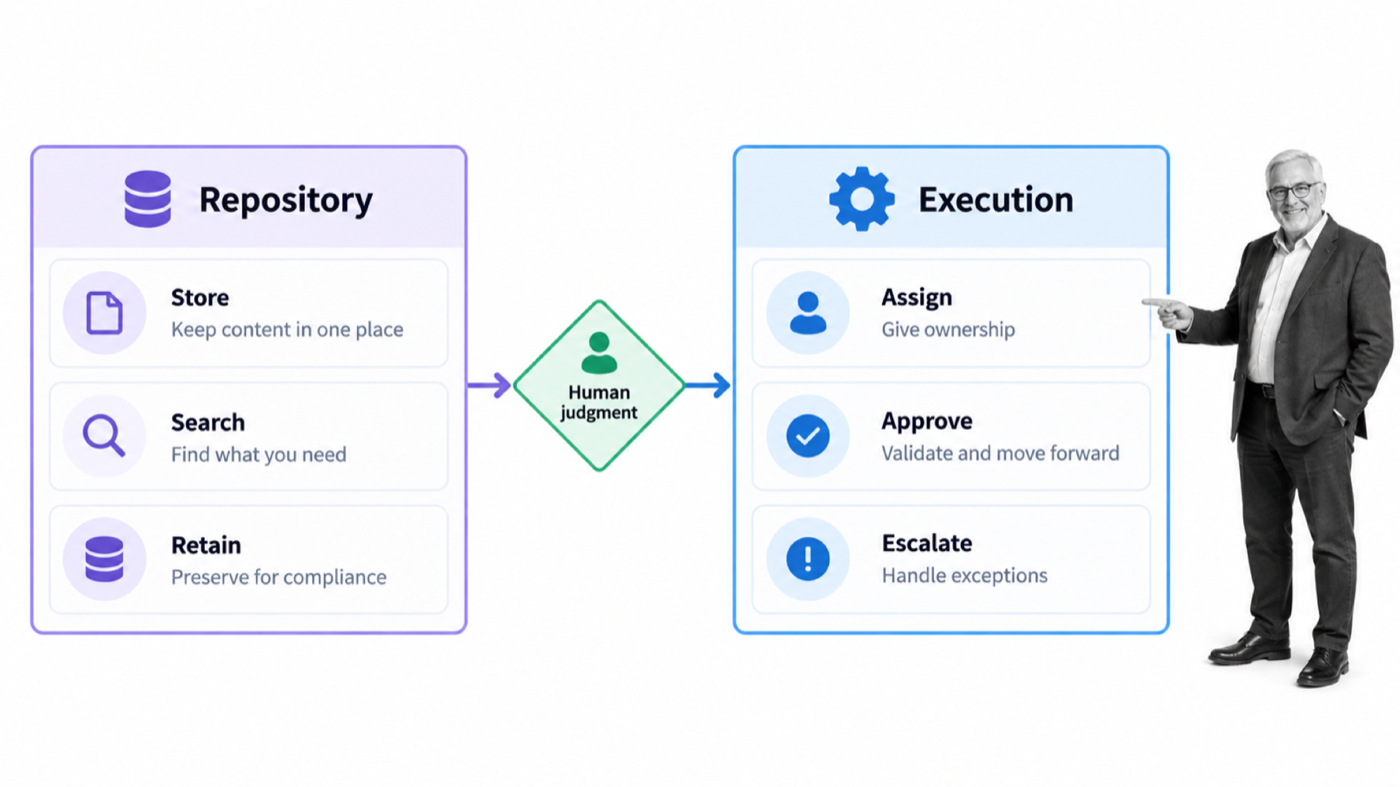
While the benefits of ECM software include content centralization, increased productivity, enhanced accessibility, and stronger controls, it is also important to look at what some all-in-one ECM tools are not capable of. The limits differ by product and implementation, so teams should test them against real content and real exception paths.
An ECM platform can provide strong controls, but it cannot create an information-governance program by itself. Technology cannot decide which content matters, resolve competing ownership claims, define a useful taxonomy, or determine the right retention rule without input from the people accountable for the work.
It cannot replace ownership and policy
Someone must own each important content class and the policy around it. If no one is accountable for reviewing a procedure, approving a contract template, or disposing of expired records, the repository will reflect that ambiguity. A workflow can remind and escalate, but it cannot invent legitimate authority.
The same applies to access. A platform can enforce a permission model, but the organization has to decide which roles need which information and how exceptions are approved. Broad access may expose sensitive data. Excessively narrow access can make the system unusable and push employees back to shadow storage.
It cannot guarantee adoption or clean metadata
A technically sound repository still fails if employees continue saving critical files to personal folders or attaching copies to email. Adoption depends on clear procedures, usable interfaces, training, migration, and leadership follow-through. The governed path must be easier and more reliable than the workaround.
Metadata quality has the same limitation. Automated extraction and AI suggestions can reduce manual entry, but owners still need rules for naming, classification, validation, and exceptions. Duplicate files, incomplete fields, and conflicting taxonomies weaken search and automation no matter how advanced the platform is.
It cannot run every adjacent business process
Many ECM tools include workflow features, but the repository is not automatically the best place to coordinate every cross-functional process. Employee onboarding, vendor review, incident response, policy attestation, and audit preparation may involve people, approvals, deadlines, systems, and evidence beyond the content platform.
If an organization wants to integrate with other pieces of software and build useful automations that go across applications, it may not be able to do that easily with every ECM tool. Some platforms integrate broadly, while others require specialist development for newer or less common systems. The evaluation should cover APIs, connectors, authentication, event handling, retries, and the ownership of failed integrations.
The clean design is often a system of record for governed content connected to an operations layer that assigns work and proves execution. The boundary should be deliberate. The content system controls the authoritative material; the workflow system controls the tasks, decisions, exceptions, and handoffs around it.
It cannot remove the need for judgment
AI can classify a document, extract terms, flag a mismatch, or draft a summary. It should not receive unlimited authority over consequential access, retention, legal, or compliance decisions. High-impact actions need defined scope, validation, audit history, and a named human owner for exceptions.
Which enterprise content management tools should you consider?
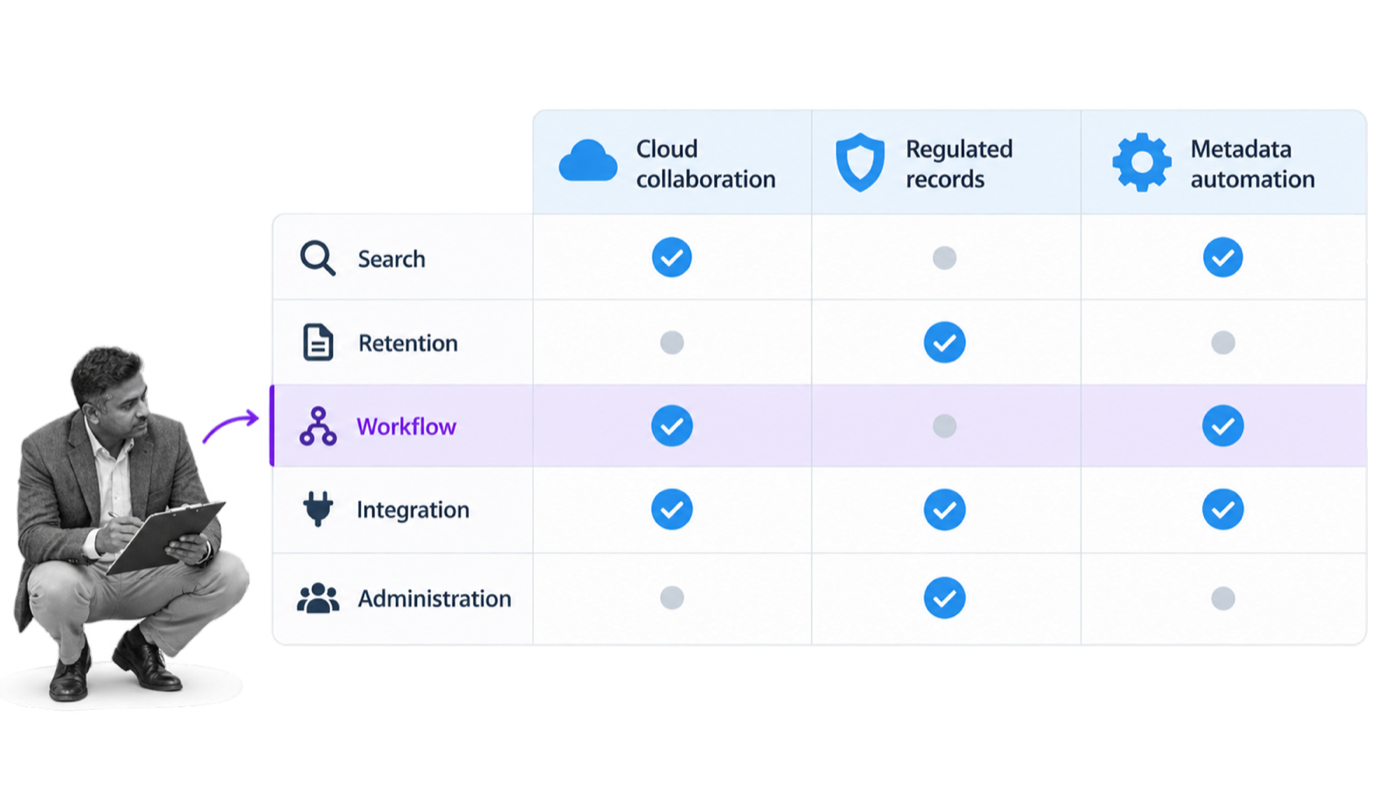
The right enterprise content management software depends on the content, controls, systems, and people it must support. Start with requirements, not a feature count. Map the content lifecycle, identify regulatory and contractual obligations, list the systems that create or consume content, and decide who will administer the platform.
Use a short evaluation scorecard before vendor demos. The following criteria expose the differences that matter in practice.
| Criterion | Questions to ask |
|---|---|
| Repository and search | Can users find the authoritative item by full text, metadata, relationship, and permission-aware search? |
| Governance and records | Does it support versions, approvals, retention, legal hold, audit trails, and defensible disposal? |
| Workflow depth | Can it route reviews and exceptions, or will it need a connected operations platform? |
| AI and automation | Are extraction, classification, summaries, and retrieval governed and traceable? |
| Integration | Does it connect cleanly to the systems that create, use, and archive the content? |
| Administration | Can the team manage permissions, taxonomy, migrations, and change without excessive specialist dependency? |
Box
Box Intelligent Content Management is a strong cloud-first option for secure collaboration, governed content, metadata, e-signature, workflow, AI, and integrations. It fits organizations that want one cloud content layer across many teams and external collaborators.
Evaluate Box when collaboration and ease of adoption matter alongside security and governance. Confirm records, data residency, workflow, and administrative requirements against the intended plan and industry obligations.
Microsoft SharePoint
Microsoft SharePoint is a natural contender for organizations already standardized on Microsoft 365. Document libraries, metadata, permissions, search, collaboration, retention, and Microsoft’s automation and AI ecosystem can create a broad content environment.
SharePoint rewards strong information architecture and governance. Without deliberate site, library, permission, metadata, and lifecycle design, it can reproduce the same sprawl an ECM initiative is meant to solve.
Hyland OnBase
Hyland OnBase combines content services, case management, workflow, capture, and records capabilities. It is often a fit for document-heavy and regulated operations where content needs to move through a structured case or transaction.
Consider OnBase when the use case depends on deep content-process coordination, industry solutions, and complex case work. Implementation and administration requirements should be evaluated with the same care as the feature set.
Laserfiche
Laserfiche provides document and records management, capture, forms, workflow automation, audit trails, and AI-assisted content capabilities. It is a durable choice for organizations that need formal records governance and process automation around documents.
Evaluate the deployment, records, workflow, search, integration, and administrative model against the organization’s content classes. A strong platform still needs a clear migration and governance plan.
M-Files
M-Files organizes information through metadata and relationships rather than relying only on folder location. That approach can help users find content by what it is, who owns it, which customer or project it relates to, and where it sits in a lifecycle.
M-Files is worth considering when metadata-driven context, federated information, and knowledge-work use cases are central. The organization still needs a practical taxonomy and ownership model to get the full value.
DocuWare
DocuWare focuses on document management, capture, intelligent document processing, and workflow automation. It is a practical contender for invoice processing, employee records, document approvals, and other structured document-heavy processes.
Choose it when the priority is to digitize and automate specific document flows with a clear repository and indexing model. Test exception handling, integrations, records needs, and administration with real sample documents before committing.
OpenText, IBM, Google, iManage, Oracle, and other platforms may also belong on a shortlist depending on scale and industry. The goal is not to select the most famous vendor. It is to select the platform that can govern the organization’s actual content and fit the work around it.
How can Process Street strengthen enterprise content management?
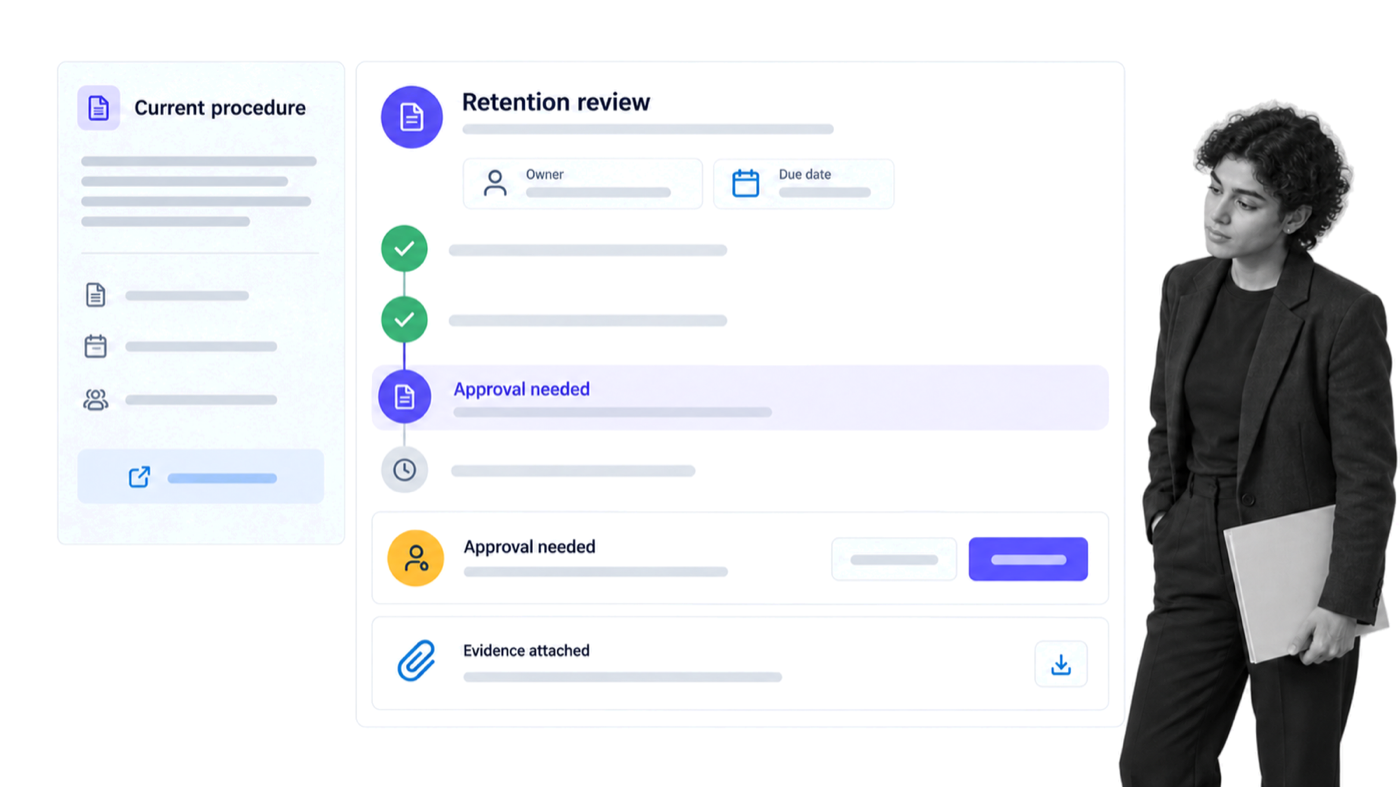
Process Street is one Compliance Operations Platform with Docs and Ops capability areas plus built-in AI. It complements an ECM system by turning governed content into repeatable execution with owners, forms, approvals, due dates, conditional logic, integrations, and evidence.
An ECM repository answers where the authoritative policy, contract, record, or procedure lives. Process Street helps answer what happens next, who must act, which decision is required, what evidence must be captured, and how the organization proves the process ran as intended.
Keep procedures connected to execution
Docs gives teams a governed place for procedures, policies, and process knowledge. Ops turns that knowledge into workflows employees can run. A policy does not sit apart from the work it governs; the relevant instructions, fields, approvals, and evidence appear in the process where they are needed.
Teams can upload important content so colleagues can access it and download it straight to their devices. They can also keep documents and information from connected systems available in the workflow where the work is completed.
For enterprise content management, that connection can support document review, policy approval, records classification, retention review, access requests, legal-hold intake, vendor-document collection, and final disposal. The ECM system remains the source of record for the content. Process Street coordinates the people and actions around it.
Make ownership and approvals explicit
A workflow can assign each review to a named owner, set a due date, require an approval, and escalate overdue work. Conditional logic shows the steps that apply to the record, jurisdiction, risk, or content type. That reduces the gap between a governance policy and the way employees actually handle information.
Evidence remains attached to the workflow run. An auditor or manager can see who completed the task, which version was reviewed, what decision was made, and when the handoff occurred. The result is stronger proof than a policy document plus a collection of disconnected emails.
Use built-in AI inside defined controls
Built-in AI can help turn source material into a workflow, summarize approved context, extract structured information, and assist with routing or review. The workflow provides boundaries: approved data, allowed actions, validation, risk-based approval, and an audit trail. People retain ownership of exceptions and consequential decisions.
Connect the content stack
Process Street has direct, universal integrations to 5,000+ systems. Need a new one? An AI agent builds it on the fly. That lets a content event start controlled work, and lets a completed workflow return a verified status or evidence package to the appropriate system.
A contract uploaded to an ECM platform can start a review workflow. A policy release can trigger acknowledgement and training. A retention date can start a disposition review. A completed approval can update the content record and notify the responsible team. The connection is useful because the repository and operating process remain aligned.
Start with one governed content process
Choose a recurring content process with clear ownership and meaningful risk. Records disposal is a good example because it needs a schedule, a review, authorization, evidence, and a final disposition. The Records Disposal Checklist and Records Management Training templates provide practical starting points. Security and control teams can also adapt the ISO 9001 Internal Audit or Vendor Management Supplier Evaluation workflows.
The Process Street template library also includes practical starting points for Cash Management, Customer Service Management Procedures, Diversity Management, Environmental Management System implementation, Expense Management, Financial Management for New Projects, Helpdesk Management, Inventory Management, Network Security Management, Patch Management, Performance Management, Privileged Password Management, Project Management, Risk Management, Scrum Project Management, Supply Chain Management Procedures, Task Management, Vendor Management Contract Negotiation, and ISO 9001 and ISO 14001 Integrated Management Systems. Select only the templates that fit the governed content process and adapt ownership, evidence, and controls to the organization.
Define the authoritative repository, content owner, trigger, approver, evidence, exception path, and final system update. Run the process with real cases, review where people hesitate or work around it, and improve the design before expanding to another content class.
ECM keeps enterprise content controlled across its lifecycle. Process Street keeps the work around that content controlled as well. Together, they make it easier to find the right information, act on it consistently, and prove what happened.
Here’s to finally being content with your content management.
The post Enterprise Content Management (ECM): How to Organize Your Content Like a Pro first appeared on Process Street | Compliance Operations Platform.


0 Commentaires