
Every business runs on software now. For the people who own those businesses, that dependence is not a background fact, it is the operating environment. The tools decide how fast work moves, how much gets dropped, and how much of the week disappears into copying things from one screen into another.
The average company now runs somewhere north of 250 SaaS applications, and roughly half of the licenses it pays for go unused in any given month. That is the modern shape of a very old problem. The question is not whether you have enough tools. It is the point at which the technology starts to hinder rather than help.
Your job as an operator is to grow the business, and one of the decisions that quietly determines whether you can is which technology tools are the right ones to use.
Choose your tools wisely
Some tools automate manual work. Others help you manage your processes. With each new tool there comes a potential new benefit for your business.
However, in choosing your tech, you have to balance cost, need, and perhaps most importantly, complexity.
Because sometimes it is clear that having a messy or sub-optimal software stack, a mixed bag of one-trick ponies, causes more problems than it solves. Call it a sickness for your business, diagnosed as multiple systems chaos.
In this article I want to take a closer look at that problem and break down the different kinds of solutions that exist, with real examples of how people have used them to prevent it in their business. I will also show how some of the world’s biggest companies organize their software stacks to avoid it.
So, first of all, what exactly is a software stack, and what exactly is multiple systems chaos?
Software stack, defined
A software stack is the full set of applications a business uses to run itself: the office suite, the CRM, the project tracker, the chat tool, the billing system, the workflow platform, and everything else that has a login and a monthly invoice. Developers use the term for the layers of a technical architecture. Operators use it for the layers of a company.
A good stack has one tool per job and a clear way for those tools to talk to each other. A bad stack has three tools per job, no clear owner for any of them, and human beings acting as the integration layer.
The multiple systems chaos problem
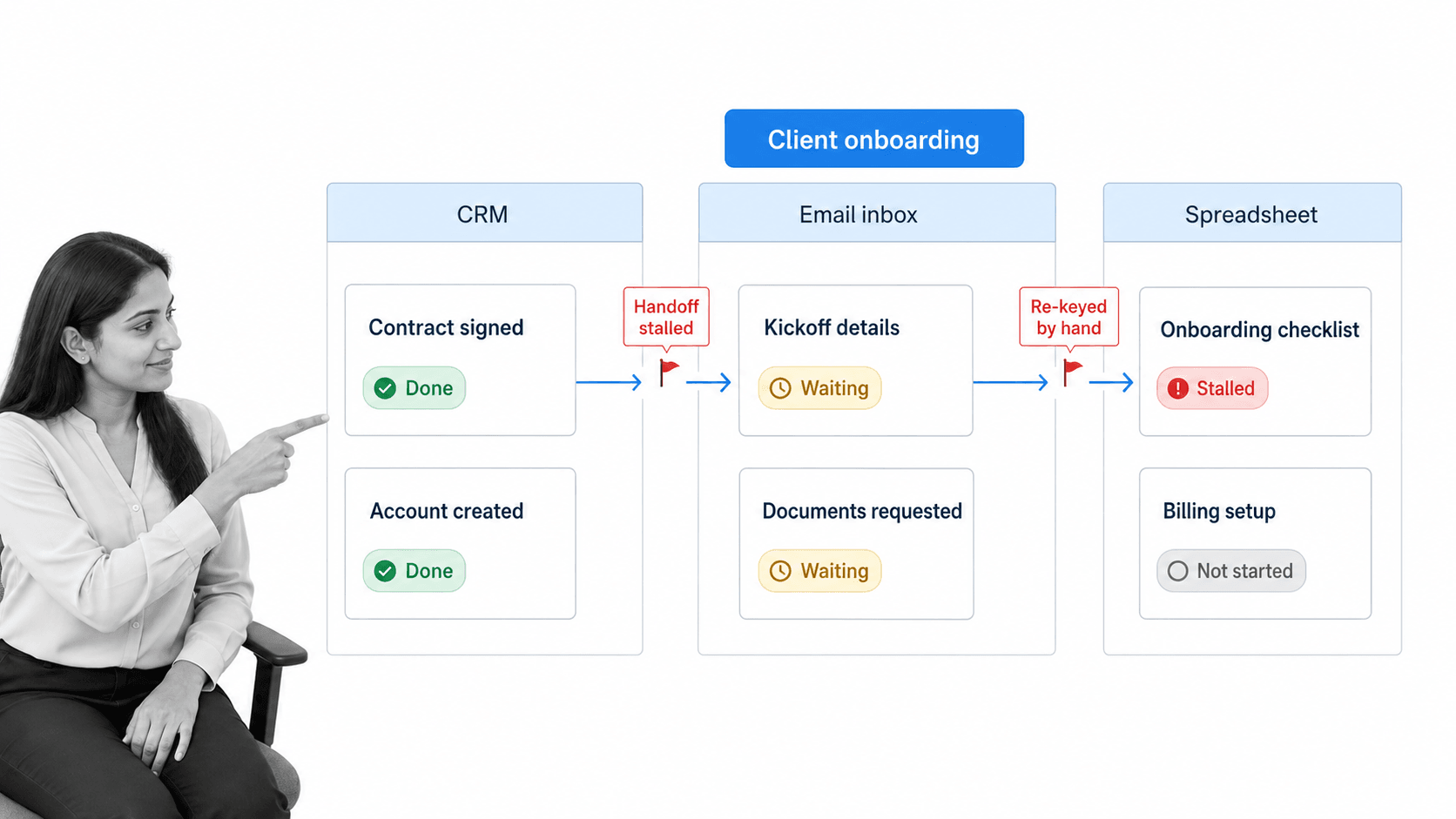
Multiple systems chaos can be explained with the simple statement that overcomplexity in your software stack breeds all kinds of efficiency problems.
For example, you might be spending more money, or wasting more time, or exerting more mental energy by having 10 different tools doing 10 different things. These tools also need to talk to one another, and everyone in your company will need to be familiar with all 10 of them.
See where I am going with this? But then, what causes multiple systems chaos to arise?
Multiple systems chaos does not simply result from choosing cheap tools, though it definitely can. Rather, it is an organizational problem where there are too many incompatible tools trying to work together as part of a single software stack.
When different software tools are trying to communicate and work together to solve a single problem when they were never designed to, you are going to have a problem. The cost shows up twice: once on the invoice, and again in the hours your team spends being the glue. That second cost is why vendor consolidation, rather than vendor accumulation, is now the dominant direction of travel in SaaS management.
And it is true that reducing the number of systems needed to solve a given problem is one solution, whereby the complexity of the software stack is reduced. For your business, that means less manual work and a more streamlined workflow that is easier to navigate.
However, there is more than one way to avoid multiple systems chaos, each of which tackles the underlying problem of an overly complex and sub-optimal software stack from a different angle.
Read on for a breakdown of each one.
The all-in-one route
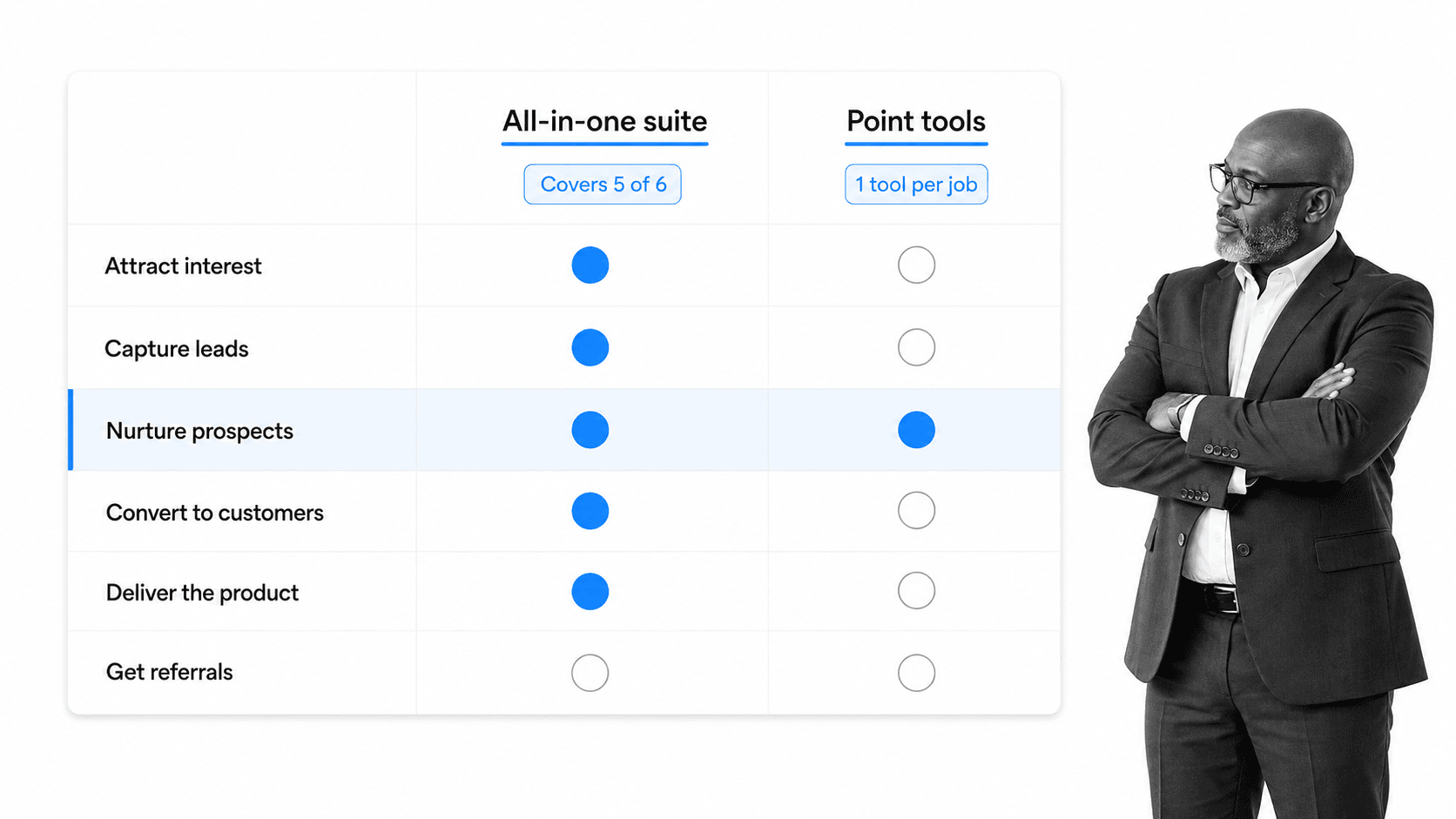
Trent Dyrsmid neatly presented the multiple systems chaos problem when he wrote about the deliberation he faced over his business’ software stack; more specifically, the choice between Aweber and Infusionsoft, now sold as Keap.
His argument began with the premise that all businesses have in common a list of seven pretty important things that are crucial for success:
- Attracting interest
- Capturing leads
- Nurturing prospects
- Converting prospects to customers
- Delivering your product
- Upselling and repeat sales
- Getting referrals
From this, he concluded that using Aweber would have caused him multiple systems chaos because Aweber is a very simple application that does one thing very well.
Because Aweber only does one of these seven things, he argued that he would definitely need other systems to handle the other parts of his business, resulting in a bigger software stack, which means increased complexity.
He claims that by choosing many one-trick-ponies like Aweber for the software stack, more manual work is unintentionally created from the need to manage all of these new systems.
Trent’s solution reduces the number of items on the software stack by offering four of the seven points in his list, all in one.
The arithmetic still holds in 2026, and it is the cleanest argument for buying a suite. If one contract covers four jobs, you have four fewer vendors, four fewer logins, four fewer renewal dates, and four fewer places for a record to go missing.
The integration route
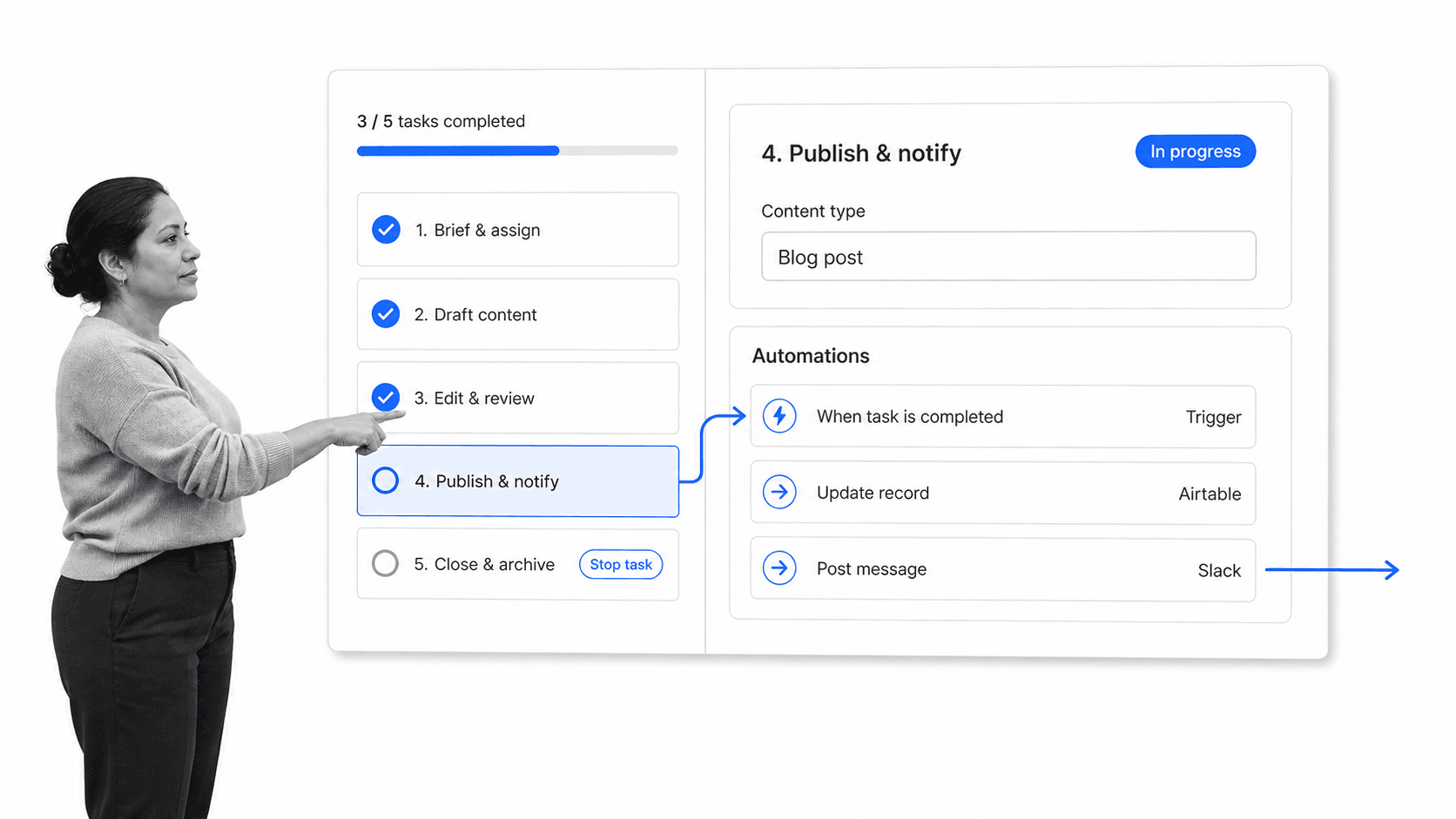
At Process Street, we depend on a set of applications to get things done. Our content team’s day-in, day-out software stack is three tools:
- Airtable
- Process Street
- Slack
So the team’s user experience is made up of three separate pieces of software. Each piece has been carefully selected and integrated to fulfill different, sometimes multiple goals.
For example, Airtable provides a robust and versatile database overview of project calendars, assignments and deadlines. It also speaks to Process Street, launching checklists and sending updates back into Slack.
Process Street alone allows the team to run and automate complex recurring processes daily, with a task in a workflow triggering Airtable records, task assignment, and more.
Slack then provides the communications channel that binds Airtable and Process Street together with notifications and messaging, also tied in with integrations to automate parts of the workflow at large.
These three tools solve different problems; they are also all set up to communicate with one another to reduce manual work.
In Trent’s case, the choice of a suite certainly made sense because it offered a single, well-packaged solution to the problem of software stack complexity. Running Process Street, though, I have watched this play out across thousands of customer stacks as well as our own, and the problem of multiple systems chaos can be tackled a second way: agile tools used together with integrations.
What is more, a lot of the time there just are not all-in-one solutions available that offer everything you need, so more complex systems are almost inevitable.
But of course, that does not mean that multiple systems chaos is inevitable.
There are many ways to implement integrations to allow your systems to talk to one another, eliminating that same manual work that results from the need to over-manage complex systems. Once the stack is trimmed, the right workflow tools are what keep the survivors talking to each other.
With integrations, you can build your own single system made up of multiple smaller modules, all communicating to one another.
This way, you avoid multiple systems chaos by achieving an optimized level of efficiency through a solution customized for your exact business needs.
Process Street has direct, universal integrations to 5,000+ systems. The integration framework is agentic: when you need a system that is not pre-wired, an AI agent stands up the connection on the fly. That matters for a lean stack, because it means the tools you choose no longer have to be chosen for how well they happen to plug into each other.
Learn more about how you can use Process Street as an integration powerhouse:
The awareness and planning route
Growth breeds complexity.
This is discussed at length in Going the Distance: Why Some Companies Dominate and Others Fail by Kevin John Kennedy and Mary Moore, where they use the analogy of a double-edged sword to explain complexity within a company.
Their argument was that complexity could be weaponized, and in fact sometimes could provide a competitive advantage.
Key to this, however, was adequate planning and awareness of the current state of the business, as well as the context, or niche, within which it operates. Bain made the same case in its work on killing complexity before it kills growth.
The same goes for preventing multiple systems chaos.
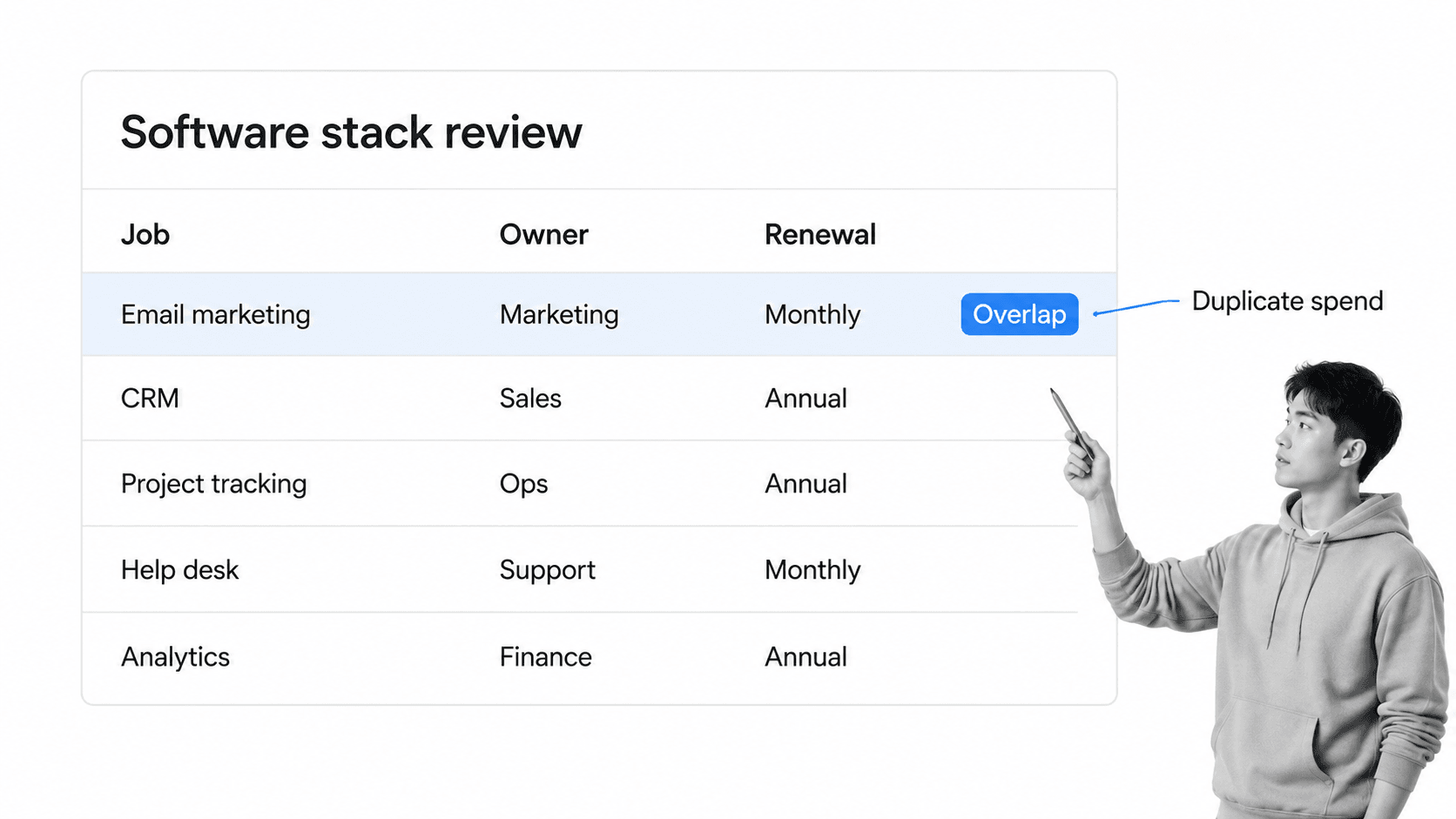
Consider what systems you are currently using, and think about what other systems you will need as you grow; start planning for the future now. The practical version of this is a periodic software stack review: list every tool, name the job it does, name its owner, note when it renews, and flag anything that overlaps with something you already pay for. Most companies find at least one duplicate on the first pass.
It is a no-brainer, but planning, and in turn picking your platforms well, can help you make the right decisions about what new technology to implement, and will save you time and money in the long run.
It also pays to learn to make the most of the platforms you are already using. This is where integration plays a big part again.
For example, though the team touches at least three separate tools on a daily basis, there is a fourth part of the puzzle: an automation layer. Whether that is Zapier or a native connection, its job is to connect tools together, which effectively reduces the number of tools you actually end up interacting with.
Going to Airtable to create or update a record might be necessary as a step in a daily workflow, but nobody has to deal with the increase in complexity that step brings, thanks to the automation sitting behind it.
What that means for the person doing the work is a more streamlined experience. The stack on the invoice grew. The stack they touch did not.
One more planning note for 2026: AI is now the fastest-growing category in most stacks, and it sprawls exactly the way SaaS did. An AI layer can collapse a stack by doing work that used to need three tools, or it can quietly become the eleventh tool nobody owns. Which one it becomes is a planning decision, not a technology decision.
How do some of the world’s biggest companies avoid multiple systems chaos?
Let us look to some of the largest, and therefore most complex, companies in the world to learn about how a well-built software stack can circumvent multiple systems chaos.
For these examples I am focusing more on business and utility, as opposed to developer tools, and highlighting the kind of approach each company has taken. The useful thing about looking at this tier of company is that, despite their scale, they are not using products out of the reach of smaller companies. Public stack directories such as StackShare are where a lot of this is catalogued, though they are best treated as a starting point rather than a live inventory.
Uber
Uber is listed as using a wide range of different tools. But, despite their global expansion, the business side of the stack is made of products any small team could buy.
Google Workspace
Google Workspace is Google’s productivity suite, offering web-based email, calendar, documents and more. It is the clearest everyday example of the all-in-one route: one contract covering several jobs at once.
Offering extensive integration, and in general serving as a versatile toolkit for tackling many potential business problems, choosing Google Workspace for your business software stack will definitely help mitigate multiple systems chaos.
Zendesk
Zendesk is a leading cloud-based service platform which also offers great support for integration.
It is likely that Uber’s customer service solutions are focused here, similarly to how we use Intercom at Process Street, meaning the problem this tool is solving will likely not depend on all of the other tools in use by the company. Complexity avoided.
Asana
Primarily a project management tool that aims to help teams track the work they do via an online database, similar to Airtable, Asana is another strong example of integration potential, and a versatile contender for a place on any decent software stack.
eBay
One of the traditional giants of the online world, eBay has been around for a while and bought out whole systems to include in their internal toolkit. See PayPal.
A couple of extra pieces we might find in eBay’s software stack include:
WordPress
As well as integrations, the content management giant WordPress offers even more integrative potential with webhooks.
PayPal
As an online payments platform, PayPal itself is already relatively lightweight to deploy and use as part of your business workflow.
That does not stop it from featuring a bunch of additional integrations, however, with an extensive Zapier catalogue as well as a well-developed native payment integration API.
Product analytics
The analytics slot is the one most likely to churn on any stack, and eBay’s is no exception. This is worth a note for your own planning: the tools that measure your business tend to have the shortest shelf life on the stack, so pick ones whose data you can export and whose events you can replay elsewhere. An analytics tool you cannot leave is a lock-in, not a stack.
Yelp
Yelp finishes off our list with a couple of tools you might be familiar with. Its inclusion of a password manager is wise and should probably be seen as standard for any modern software stack.
Let us take a look:
Google Workspace
A familiar face, here we see Yelp exploiting Google Workspace’s vast potential as an all-in-one online office suite.
Whilst Google Workspace boasts an integration potential as good as any, and I would bet that Yelp are indeed integrating it with Salesforce, the strength here is in the simple, single platform that Google offers.
Note: Yelp also make use of Google Analytics, adding more fuel to the all-in-one fire.
OneLogin
This access management tool, now sold as OneLogin by One Identity, facilitates easy log-ins across all of the other apps on the stack, and offers directory integration as part of its main value proposition, as well as SSO, user provisioning and more.
It is immediately clear, the value a tool like this brings to a software stack prioritizing an all-in-one solution. Single sign-on is also one of the few pieces of a stack that gets more valuable the more tools you have, which is precisely why it is the one addition worth making even while you are cutting elsewhere.
Salesforce Service Cloud
Yelp’s helpdesk sits inside Salesforce, and as such comes with much of the integration power of its parent platform.
There are a ton of integrations available for Salesforce; we even made a video about it.
Lean software stack on a budget
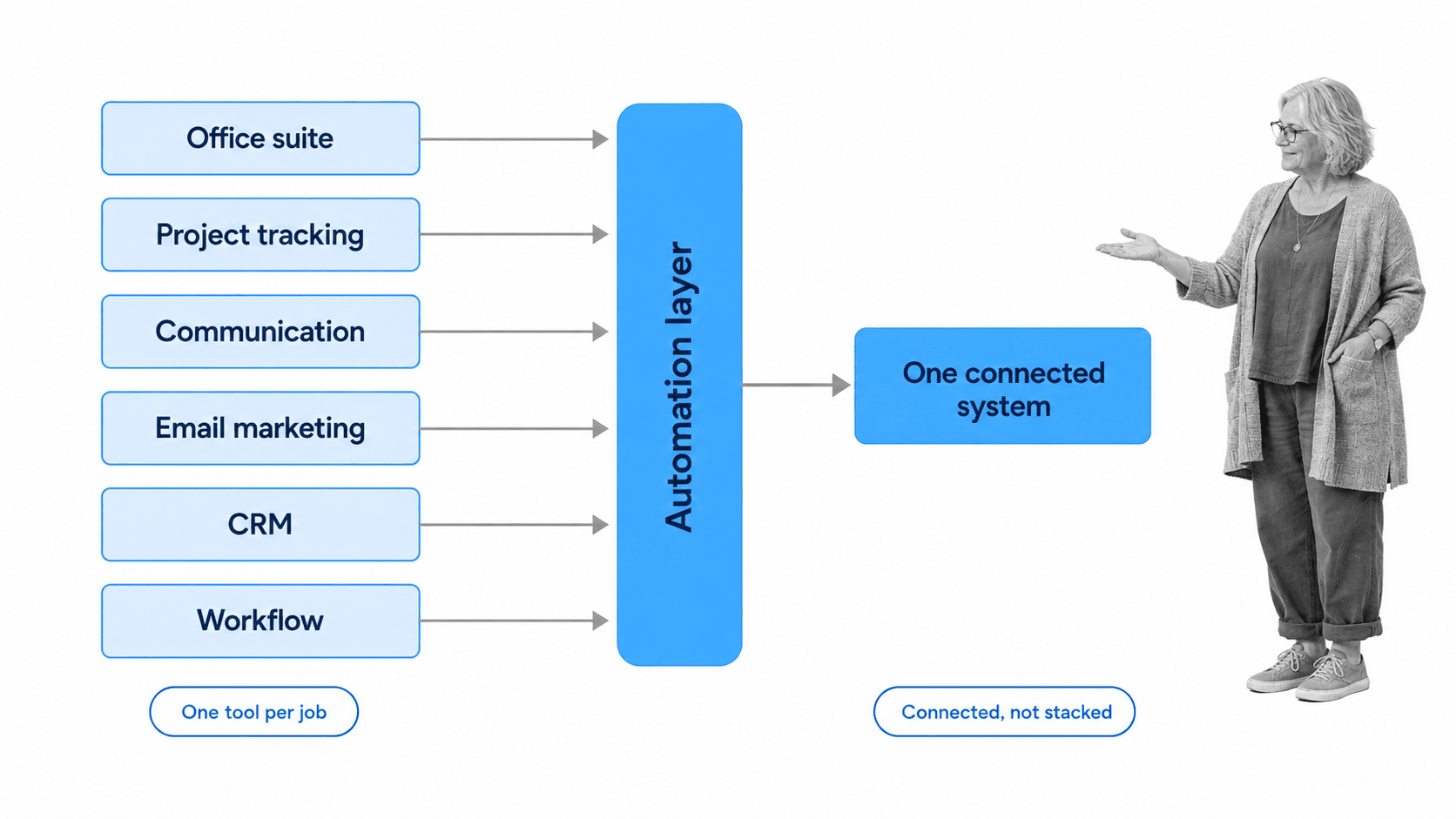
So what is the best choice, if you just want to hit the ground running with a software stack setup that is lean, robust, and workable?
Fundamentally, you will do well by combining all of the advice in this article together.
A slim stack is great, but you still need to spend time choosing the right tools to meet your own specific business needs and goals.
In any case, here is a quick and dirty list of tools to use for your software stack if you are on a tight budget, based on everything covered above:
- Google Workspace (office suite)
- Airtable (project management)
- Slack (communications)
- Mailchimp (email marketing)
- HubSpot (CRM)
- Process Street (workflow and compliance operations)
All of these are highly integrated, so you will not need to worry about much friction arising between them, as long as you set them up correctly. Six tools, six jobs, one connective layer. That is the whole design.
Ultimately, automation plays a big part in reducing complexity, and by improving your processes, you reduce the chance you will suffer from multiple systems chaos in your business.
Learn more about process automation
If you are interested in learning more about what integrations, automation, and processes can do for your business, check out these ebooks:
- The Ultimate Guide to Business Process Automation
- The Ultimate Guide to Small Business Automation
- The Complete Guide to Business Process Management
And if you need the workflow layer of your stack to do more than store documents, Process Street is a Compliance Operations Platform that brings governed documents, execution, and built-in AI oversight into one system. You can build workflows and run them with due dates, conditional logic, stop tasks, and much more.
Frequently asked questions
What is multiple systems chaos?
Multiple systems chaos is what happens when a business runs one process across too many incompatible tools. The tools each work fine on their own, but the handoffs between them stall, records get re-keyed by hand, and every person involved has to know every system. It is an organizational problem rather than a budget one, which is why buying more expensive tools does not fix it.
How many tools should a small business use?
There is no correct number, but there is a correct test: one tool per job, and a named owner for each. If two tools do the same job, or a job has no tool and someone is covering it with a spreadsheet, you have found the thing to fix. Most small businesses land between six and twelve core applications once they apply that test.
Is an all-in-one suite better than integrated point solutions?
It depends on how unusual your requirements are. A suite wins when the jobs it covers are standard for your business, because one contract removes several vendors at once. Point solutions plus integration wins when at least one of your jobs is genuinely specialised, because a suite’s version of a specialist tool is usually its weakest module. Most companies end up with a suite at the core and two or three specialists around it.
How do I know my software stack is too complex?
Watch for four signals: work waits at the boundary between tools rather than inside them, the same data is entered twice, onboarding a new hire means teaching them more than about eight systems, and nobody can name the owner of a given application. Any two of those together mean the stack is costing you more than it saves.
What is a software stack review?
It is a scheduled audit of every application the business pays for. You list the tool, the job it does, the team that owns it, the renewal date, and whether it overlaps with anything else on the list. Run it once or twice a year. The point is not to cut for the sake of cutting; it is to make sure every line on the list is there on purpose.
The post Choosing a Lean Software Stack: How to Avoid Multiple Systems Chaos first appeared on Process Street | Compliance Operations Platform.


0 Commentaires